



Best Room Correction Software: How to Choose
Room correction products are usually compared on a single axis of quality, which hides the decisions that actually separate them. The useful axes are the filter family they generate, whether they correct phase as well as magnitude, how they measure, where the correction runs, and how much latency that costs. Those choices suit different setups rather than ranking against each other. This guide sets out the axes, says which kind of user each product family suits, and describes the checks worth running before you commit to any of them.
The Axes That Actually Separate Them
Ranking correction products in one list hides the decisions that matter. Five axes do most of the separating.
- Filter family. IIR filters are recursive, cheap and minimum-phase, so they add almost no latency and never pre-ring. FIR filters can correct magnitude and phase independently, at the cost of latency and, in the linear-phase case, pre-ringing that can soften transients.
- Phase correction. Some products correct magnitude only. Others correct the phase response as well, which can tidy a crossover region and cannot fix a null caused by cancellation.
- Measurement method. Swept sines are repeatable and slow. Live transfer-function measurement with pink noise updates continuously and lets you hear the effect of moving a speaker while you move it.
- Where it runs. A system-wide audio driver, a plugin in the DAW, a dedicated processor, or firmware inside the speaker. This decides what is covered and whether games, video calls and reference tracks get corrected too.
- What it admits. Whether the product tells you which problems it decided to leave for acoustic treatment, or quietly applies a filter and lets you assume the room is fixed.
What Each Family Suits
Grouped by what they are for rather than by price.
| Family | Examples | Best fit |
|---|---|---|
| Turnkey hardware | Dirac Live, Trinnov Optimizer | Hi-fi and AV systems, and installations where the correction should live in the playback hardware rather than a computer. |
| System-wide software | Sonarworks SoundID Reference | Studio monitor and headphone calibration on a computer, with the lowest effort to get running. |
| Convolution toolkits | Audiolense, Acourate | Engineers who want to design the correction themselves and run it through a convolution player. |
| Measurement first | REW | Free, and the standard for measurement and analysis. Pairs with any EQ or DSP you already own. |
| Live measurement plus DSP | Omnissiah | Studio correction with alignment, where the correction can also be written into hardware and run without a computer. |
Omnissiah is ours, so weigh the placement accordingly. On the axes above it is minimum-phase IIR, measured live with coherence weighting, with time and level alignment included, and it can run on the computer or be written into a NEXUS so the playback path carries no added latency.
Checks Worth Running Before You Commit
Most correction products have trial periods. These checks separate them faster than reading specifications.
- 1Measure the room first with free software so you know what the problems are before any product tells you.
- 2Check the correction at more than one seating position. A correction that is excellent at one point and poor 30 cm away is of limited use.
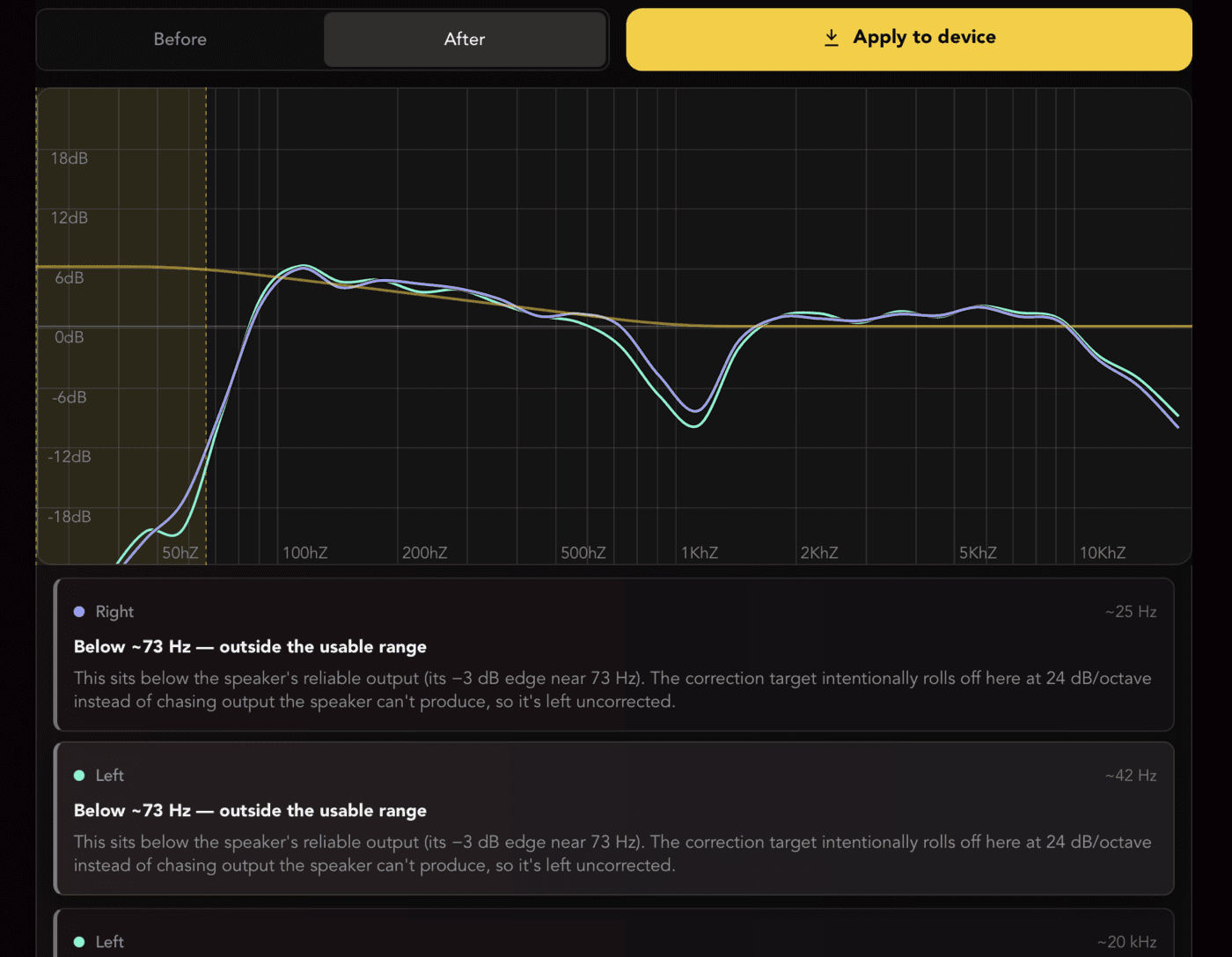
- 3Look at what it did in the low end. If it applied a large boost into a deep null, that is headroom spent on a problem that cannot be fixed electrically.
- 4Measure the latency if you record while monitoring. Linear-phase FIR correction can add enough delay to make tracking uncomfortable.
- 5Listen to a familiar reference track before and after, at a moderate level, and check whether the improvement survives at low volume.
Do's and Don'ts
- ✓Treat the room as far as you reasonably can before you correct it.
- ✓Measure at several positions across the area you actually occupy.
- ✓Prefer a product that names what it left uncorrected and why.
- ✓Check the corrected result against reference tracks you know well.
- ✓Re-measure after moving the desk, the speakers or the seat.
- ✕Do not expect correction to shorten a decay time or fill a cancellation null.
- ✕Do not apply large boosts in the low end. You are spending headroom on a problem that is not electrical.
- ✕Do not correct with a single measurement taken at one exact point.
- ✕Do not use a linear-phase FIR correction on the monitoring path while tracking without checking the latency.
- ✕Do not judge a correction by how different it sounds. Different is easy; correct is not.
Frequently Asked Questions
What is the best room correction software for a home studio?
The one that matches how you work. Sonarworks is the lowest-effort system-wide option, REW is free and the measurement standard, Audiolense and Acourate suit people who want to engineer the filters themselves, and Dirac and Trinnov live in playback hardware. The filter family and where it runs matter more than any ranking.
Is FIR or IIR better for room correction?
Neither is universally better. Minimum-phase IIR adds almost no latency and cannot pre-ring, which suits a monitoring path you record through. Linear-phase FIR can correct phase as well as magnitude, at the cost of latency and pre-ringing that can soften transients.
Does room correction software work without treatment?
Partly. It can flatten minimum-phase magnitude errors at the listening position, which is a real improvement. It cannot shorten the decay of a mode or fill a null caused by cancellation, so an untreated room stays a compromised room after correction.
How many measurement positions do I need?
Enough to cover the area you actually use, typically five to nine spread over the space your head occupies. One measurement at one exact point produces a correction valid only there, and moving slightly can make things worse rather than better.
Can I use room correction while recording?
Yes, if the latency is low enough. Minimum-phase IIR correction adds a negligible amount. Linear-phase FIR correction can add several milliseconds or more, which is enough to be uncomfortable when monitoring a live performance.
Conclusion
Choose room correction by the filter family, where it runs and what it admits to leaving alone, rather than by a ranking. If you record while monitoring, favour minimum-phase correction for the latency. If you want the whole computer corrected with least effort, a system-wide product is the simplest answer. If you want to engineer the filters yourself, the convolution toolkits are built for that. The limit that applies to all of them: correction is the second half of the job, and the first half is still acoustic treatment.
Sign up to hear more when we release something new


