




Accurate Monitoring
Makes Better Mixes
Your room changes how your speakers actually sound. Omnissiah is room correction & speaker calibration software for Mac, and it fixes that with the mic and interface you already own. No extra hardware, no guesswork.

Room Correction Shouldn’t Require A PhD.
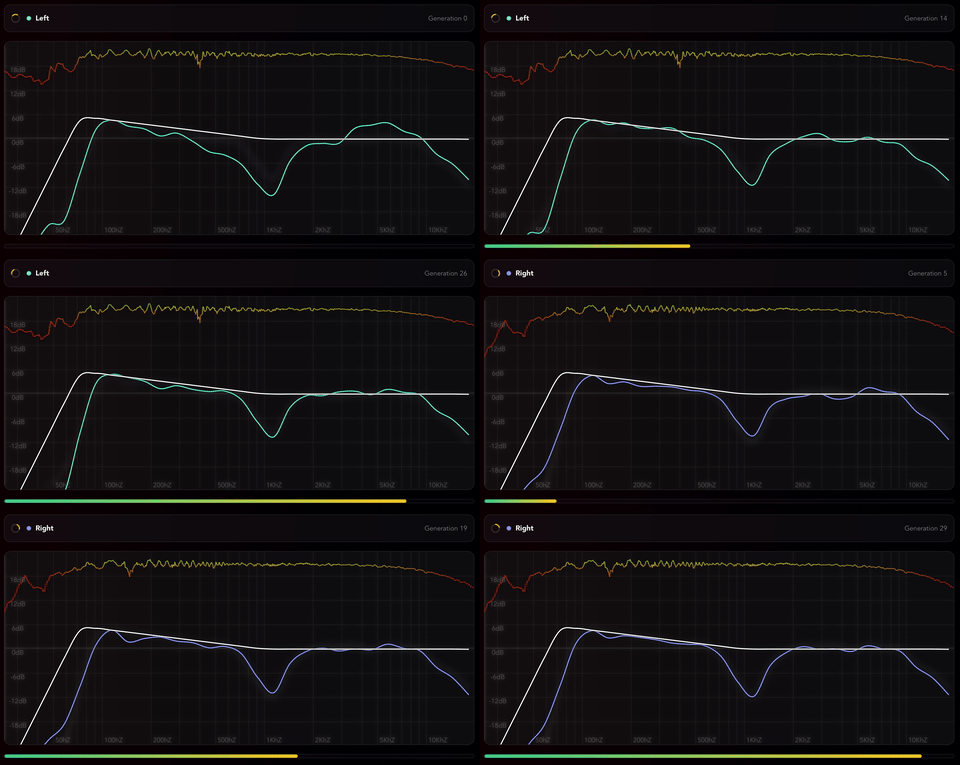
Plug in a measurement mic, follow the guided measurement, done. Omnissiah measures your speakers from the seat, then its optimiser tries thousands of corrections and keeps the best one.
Toggle before and after to hear exactly what changed, then send the correction to your Tantrum hardware or run it live through the audio interface you already own. No complicated setup. No reading a manual. No wondering if you did it right.
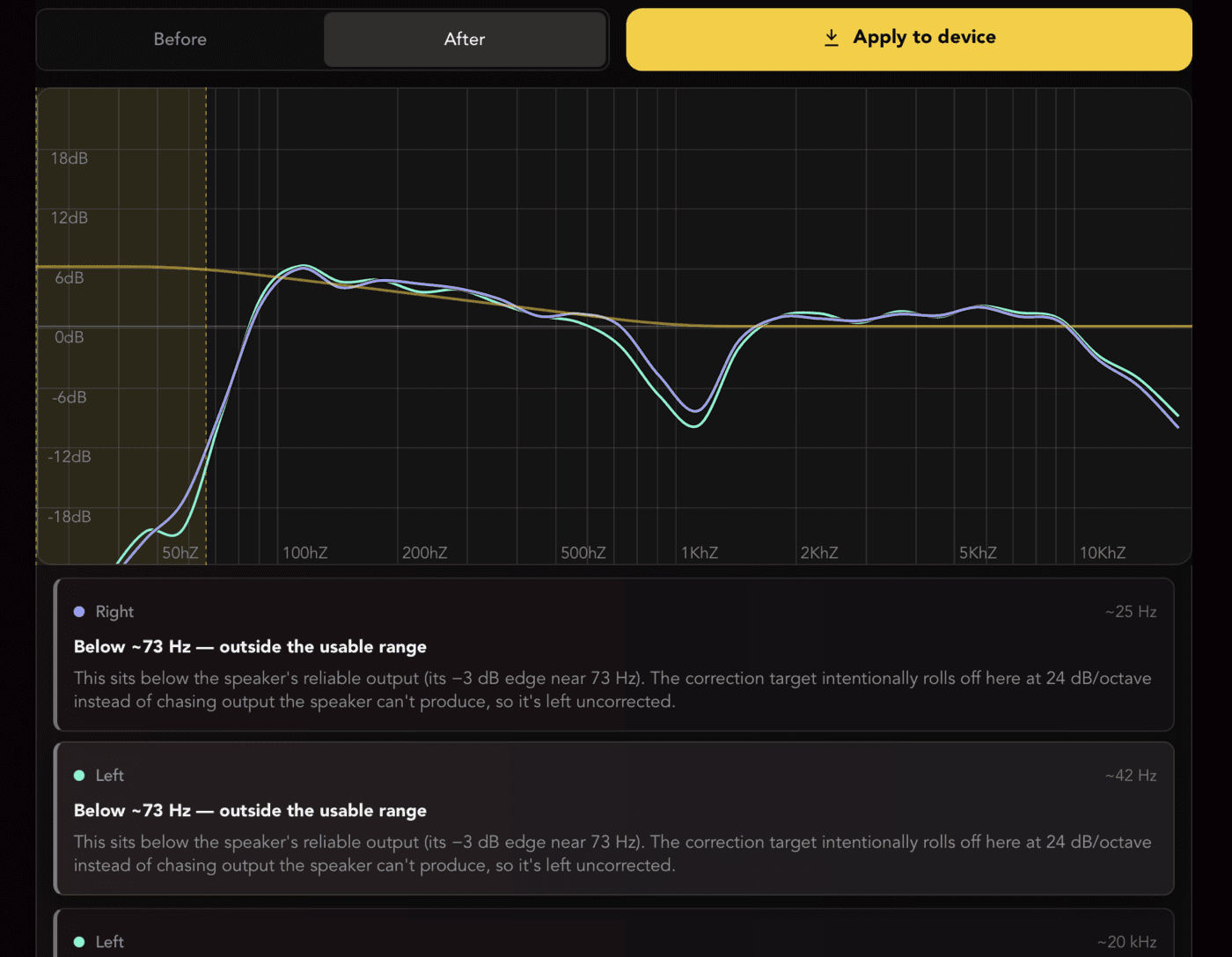
It Doesn’t Just Correct. It Tells You Why.
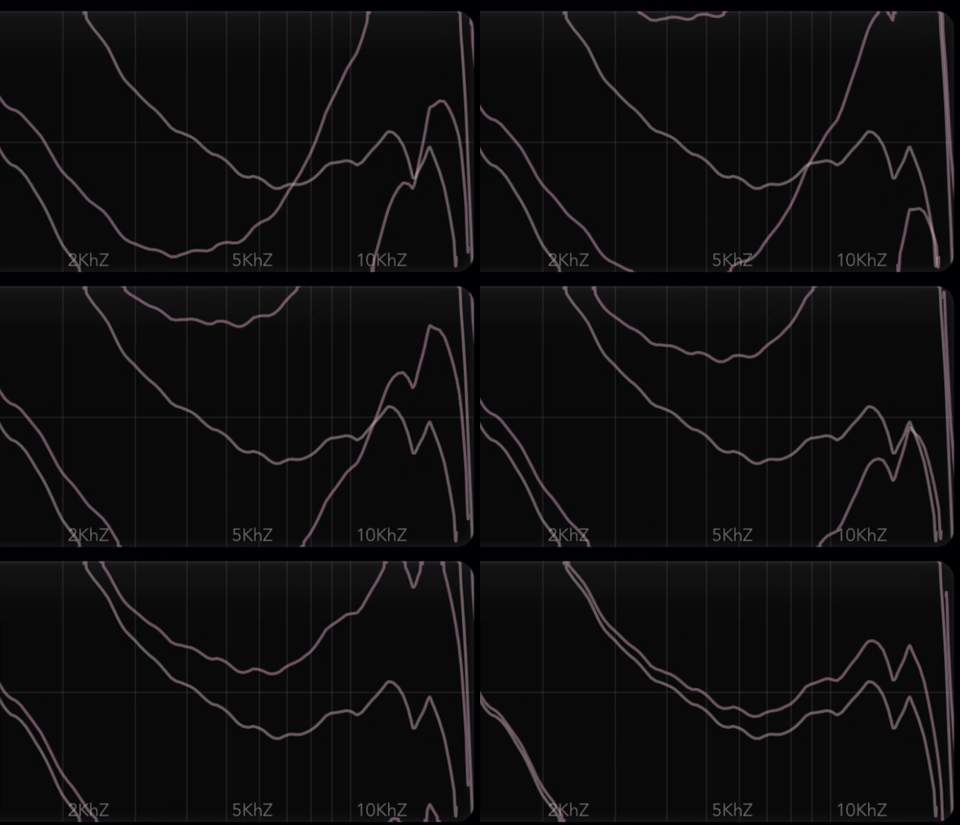
Phase & Time Alignment. Every Other App Skips This.
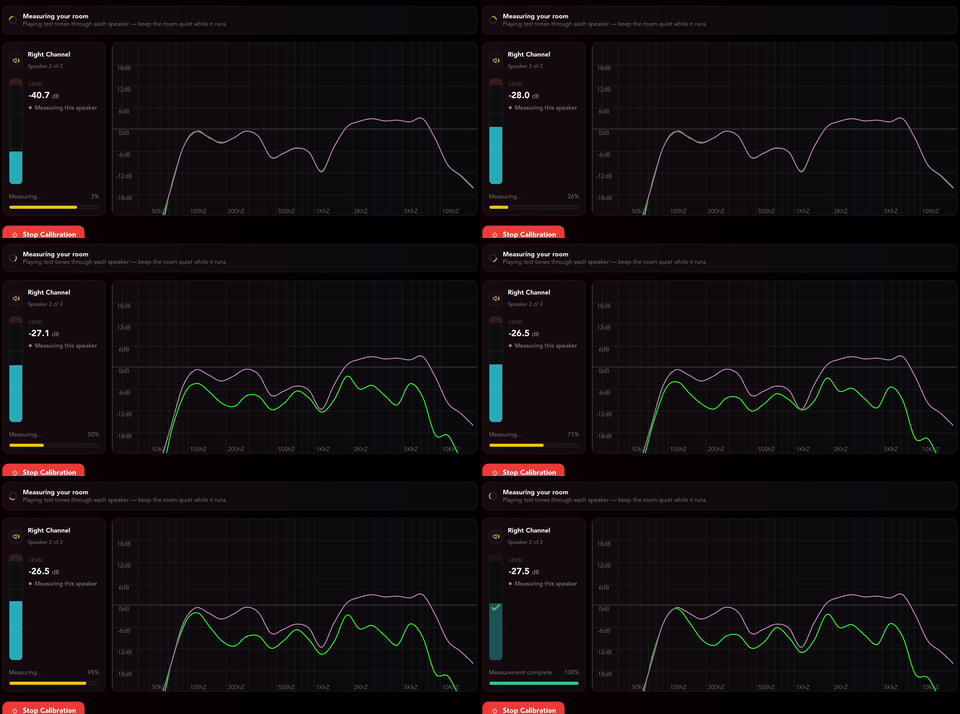
Real-Time Measurement. Iterate Fast.
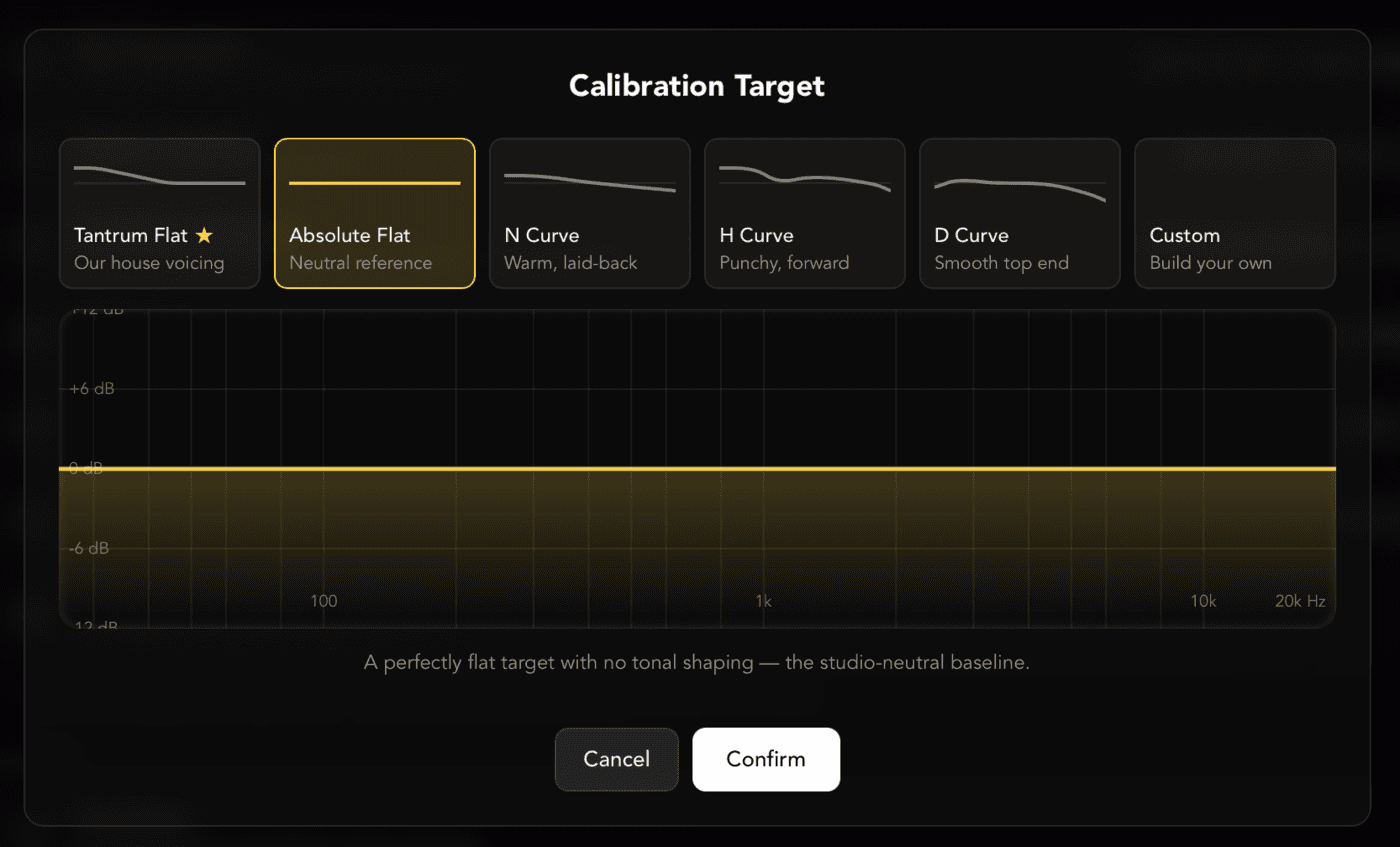
Your Sound, Your Target.
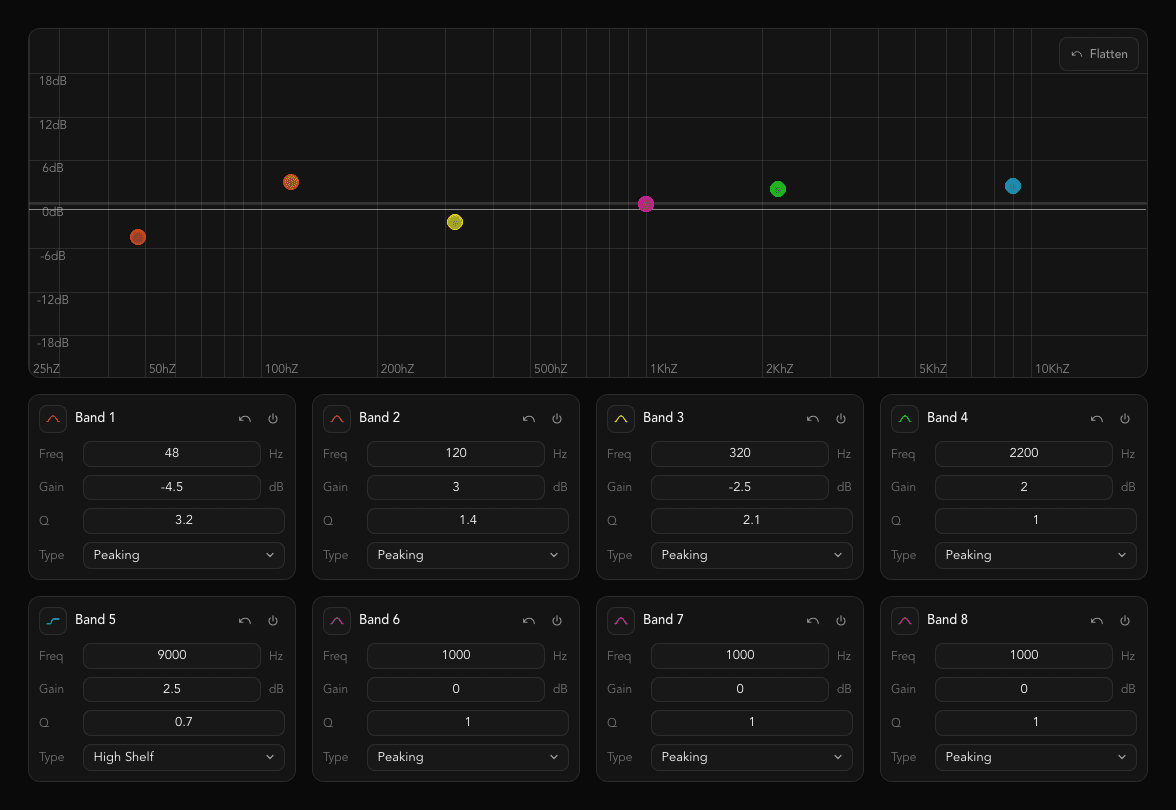
Native Control For Tantrum Hardware.
Have Your Say.
You get a direct line to development. Tell us what to build, and watch it land in a release.
Get 10% Off
We’ll email your 10% code straight away, and it works on anything we make. After that we only write when we release something new.
Realtime. Phase-Aware. Yours.
| Omnissiah | Sonarworks | ARC | Trinnov | |
|---|---|---|---|---|
| Price | $ | $$ | $$ | $$$$ |
| Realtime Measurement | ✓ | ✗ | ✗ | ✓ |
| Phase / Time Alignment | ✓ | ✗ | ✗ | ✓ |
| Room Diagnostics | ✓ | ✗ | ✗ | ✗ |
| Software Only (No Extra Hardware) | ✓ | ✓ | Hardware required | Hardware required |
| Native DSP Hardware Control | ✓ | Software only | ✓ | ✓ |
| Any Measurement Mic | ✓ | Specific mics only | Specific mics only | Specific mics only |
Sonarworks SoundID and IK Multimedia ARC measure from a captured sweep and skip phase alignment entirely. Omnissiah adds realtime measurement, phase and time alignment, and native DSP control: features that otherwise cost four figures in hardware like Trinnov.
LearnRoom Correction Software ComparedComparison based on publicly available product information as of July 2026. Competitor features and pricing may change, so please check their websites for the latest details.
Room Correction, Answered Honestly
Is room correction worth it?
Below roughly 300Hz, yes. That is where a small room does its worst damage, and where acoustic treatment would need impractical depth to help: a bass trap has to be a sizeable fraction of a wavelength to absorb anything, so trapping a 40Hz problem properly eats the room. Correction handles that band well, and it time-aligns your speakers, which no amount of foam can do. Above 300Hz it is far less useful. Early reflections arrive too late to be an EQ problem, and correcting for them mostly makes things worse. So treat the top end, correct the bottom end, and be suspicious of anything promising to fix a room with filters alone.
LearnIs Room Correction Software Worth It?Is there free room correction software?
Room EQ Wizard is free, and it is the standard measurement tool for good reason. It measures, though. It will show you the problem in detail and leave you to work out the filters, apply them somewhere, and verify them by measuring again. That loop is the work. Paid tools mostly sell you the part between the measurement and the fix: choosing the filters, applying them to the audio, and telling you whether the result is any good.
How much does room correction software cost?
Software runs from about £60 to a few hundred, depending on how many channels and features you need. Omnissiah is £59 including VAT, as a one-time purchase with future updates included. Hardware processors that do the same job, particularly the ones that handle time alignment, start in the high hundreds and run well into four figures.
What is the 38% rule in room acoustics?
It puts your listening position 38% of the way along the length of a rectangular room, measured from the front wall. At that spot you sit near a null for several of the strongest length modes at once, so the low end measures flatter before you have corrected anything. It is a starting point rather than a law. It assumes a rectangular room and a symmetrical layout, and in a lot of real rooms the desk, the door or the window decides where you sit instead. Measure two or three candidate positions and keep the one that measures best.
Do I need a special microphone?
Any measurement microphone works: a miniDSP UMIK-1, a Behringer ECM8000, or whatever you already own. Load its calibration file if it came with one. Omnissiah does not lock you to a particular microphone the way Sonarworks and ARC do, which matters if you already have one or if you would rather not buy theirs.
LearnDo You Need a Calibrated Measurement Mic?Does it work with my speakers and interface?
Any speakers and any interface. Correction runs live on the computer through the interface you already own, so nothing extra goes in the signal path. If you run Tantrum Audio DSP hardware it goes further and writes the correction to the device, so it stays corrected with the computer unplugged. macOS 11 or later today, Intel and Apple Silicon; the Windows build is due in Q4 2026.
Specification
- Intel & ARM Mac Compatible, Windows Coming Soon (Q4 2026)
- Minimum system requirements: macOS 11 or later, 4GB RAM, 2GHz CPU
- Works With Any USB Mic Or Audio Interface
- Realtime Frequency Response & Phase Data
- Realtime Coherence & Confidence Data
- Multi-Speaker Time & Phase Alignment
- Auto Room EQ With Selectable Target Curves
- Per-Channel Correction Diagnostics
- Measurement Snapshots & Comparison
- Backup & Restore To A Single File
- Native Control For Tantrum Audio DSP Products
- USB Loopback For Third-Party DSP
Updates Log
- V0.1.4
- In Band Target: calibration runs until the response fits a chosen ±0.5–6 dB band of the target, or tells you why it can't; the band is drawn on the calculation and results plots with per-channel in-band badges
- Target roll-off: match the target down to a chosen frequency, natural or 24 dB/oct below it, with the headroom cost of every option priced before you run it; the crossover frequency is now editable
- Boost Limit: choose the net correction boost ceiling from 0 dB (cut only) to 18 dB, default 6, guaranteed on the filters sent to your device; cuts cost nothing so they are not limited
- Boost/Cut Balance (Equal, Prefer cuts, Mostly cut or Cut only) and a Maximum option for Boost Restraint, with a Reset to defaults button on the Calibration settings page
- Room correction range: correction fades out around a chosen frequency, leaving the response above it as measured
- Correction history: every completed calibration is saved; view, rename, pin, restore or delete past runs from Calibrate, and Hear This auditions one on your speakers before you Keep or Undo it
- Apply to device lets you pick a different output per channel, and warns before applying a correction that doesn't fit the target
- Macros: trigger actions from MIDI or OSC, with several triggers per macro, one macro firing another, hold-to-ramp, fader and CC control over a full travel with soft takeover, and a Capture panel that lists each step as it records
- Routing is a matrix: every input into every output, with an inspector for the selected crosspoint; a stereo pair into an output links as Off, Stereo or Sum
- USB and S/PDIF source levels on the Routing tab (Nexus); sends and source levels are trim-only, 0 dB at the top
- Room lane below the measurement graph shows reflections, reverberance and how long each room mode rings, by frequency
- MTW mode on the manual measurement page: Smaart-style per-band analysis windows, long in the lows for resolution, short in the highs
- Maximum Filter Q setting caps how narrow a single correction filter may be (2 to 24, default 9.9), and room correction reads the measurement at matching detail
- Redo a mic position, or a single speaker at it, from the new review step after every guided measurement position; a Restart this measurement button appears when a moved mic stalls stability, and the pre-start dialogs now show the measurement settings
- Glitch counters in Settings → Audio count dropouts, re-centres and worst callback timing, flag a stream that failed to open or runs at the wrong rate, and show the buffer size actually running, with a Copy button for bug reports
- Update notice at launch when a newer release is on the downloads page, and Check for updates in Settings
- Restart Control, Restart DSP Core, Reflash and a USB rate mode picker in device settings, with a speaker warning before firmware updates and DSP core restarts
- Bundled Nexus firmware 0.0.23: the device now identifies as Nexus, Identify flashes its status light, factory defaults ship with every crossover off and no outputs linked, silent self-restarts and USB fixes
- Correction bypass is level-matched so A/B compares at equal loudness, and channel level alignment uses the median difference so one room mode no longer skews a channel's gain
- Phase correction leaves high frequencies intact and no longer disturbs left-right imaging
- Correction filters now spread evenly across the spectrum instead of crowding into the bass, and the correction follows your speakers' own roll-off by default instead of forcing a cut at their measured bass edge
- Room diagnostics now analyse at 1/48-octave resolution so narrow peaks and dips are no longer averaged away, and the coherence trace follows the Smoothing setting and spreads across the graph
- Fixed: loopback correction no longer exceeds 0 dBFS
- Fixed: changing buffer size or sample rate no longer freezes the app, and a loopback device missing at launch or slow to open after a restart is picked up automatically
- Fixed: the packaged app could launch with empty audio device lists and a setup page that would not finish, and measurement smoothing no longer blurs bass detail away before room correction sees it
- Fixed: an out-of-range calibration setting is rejected on entry instead of resetting every setting on the next launch, and turning off a calibration bypass no longer unmutes an output you had muted yourself
- V0.1.3
- Complete Measurement: tell Omnissiah how large your space is, from a single seat to a full venue, and it builds the plan for you with the positions, movement diagrams and weights to match
- Add secondary listening areas anywhere people actually listen, each with its own weight, so the correction knows what to serve first and what to simply respect
- Phase Tuner: a Trace/Tuner switch on the measurement and results phase plots redraws every trace against your reference, so you can see how far apart your speakers sit and where
- Room diagnostics now update live beneath the chart while you measure and in guided calibration, and hovering a card shades the band it is talking about
- Optional phase correction fine-tunes inter-speaker phase with all-pass filters after delay alignment; off by default, enable it in Calibration settings
- New device page: a mixer with a channel strip per output and a master column, plus tabs for input routing and device settings (identify, firmware, presets, reset, log)
- Redesigned channel linking, with linked changes reflected on every strip in the group and unlinking that stays unlinked after a restart
- Auto Capture starts the noise, waits until the measurement has genuinely settled, takes the snapshot and stops
- New Phase tab per output with phase rotators, a section-budget meter and an unwrapped phase graph, plus a phase thumbnail on each mixer strip
- Now ships as a universal binary, so Omnissiah runs on Intel Macs as well as Apple Silicon
- Better measurements: the missing analysis window is restored, coherence is steady at the band edges, measurement starts on real data and averaging follows proper meter ballistics
- FIFO averaging modes that settle in a fixed, predictable time, plus a custom graph view with your own dB window and frequency range
- Fixed multi-position combining cratering coherence and bass level, pink noise stutter over long sessions and a click in the loopback monitor; the audio device list now follows interfaces being plugged in and out
- V0.1.2
- Backup & restore: save every connected device's settings plus calibrations, target curve and loopback correction to a single file, and restore them later
- Linked outputs: choose per control (Mute, Gain, Delay, Polarity, EQ, Crossover) whether a link shares it or keeps each independent
- Custom target curves and a redesigned target picker with preset cards; new 'Tantrum Flat' house curve is now the default
- Crossover-aware room correction detects your crossover and rolls each speaker off there, fixing bass doubling
- Added 'Align Only' mode to align time, level and polarity without running a full room correction
- Measurement latency is now stable across runs (~19 ms drift reduced to well under 1 ms) by timing off the audio hardware clock
- Improved room correction: corrects treble roll-off, addresses room modes down to 20 Hz, and caps combined boost across stacked filters
- Reworked results page with per-channel diagnostics, a setup-assumptions summary, target reference line and a Before/After toggle
- Quick Measurement Settings let you set mic positions per speaker without leaving the calibration setup page
- Added room-correction bypass to A/B corrected vs uncorrected signal, plus Boost/Cut Trust confidence controls
- Added mono speaker support, and many fixes to alignment determinism, linked-output calibration and measurement stability
- V0.1.1
- Added a guided Quick Measurement flow with on-screen mic movement diagram
- Calibrations are now saved and persist between sessions
- Reworked calibration results page with improved before/after rendering and measurement position info
- Added loopback room correction from quick align and from a manual measurement
- Added audio engine settings with selectable default sample rate
- Improved room correction quality and optimisation speed
- Fixed audio configuration crash on config load and sample rate bugs in sliding windows
- Firmware updates and Really Mean Sub v0.0.7
- v0.0.9
- Improved measurement stability
- Improved calibration workflow and results
- Fixed bug where calibration could fail to complete
- Added 5.1 calibration support
- Added device control crossover support
- Added measurement snapshot exporting
- Added ±24dB normalised measurement view
- Really Mean Sub firmware update to v0.0.5
- v0.0.8
- You can now apply the results of Quick Align calibration directly to DSP
- Improved calibration results page with before and after graphs
- Calibration measurements now use signal to noise ratio in spectra to determine the optimal measurement level threshold, instead of taking a noise reading pre-measurement
- Improved Quick Align workflow
- v0.0.7
- Improved measurement responsiveness
- Improved fast averaging and measurement stability
- You can now reset measurement gain and delay offsets
- You can now edit measurement snapshot names and colours
- Added Quick Align to side bar
- v0.0.6
- Improved measurement stability
- Mouse Over tooltips for measurement values
- Added jitter detection and excess jitter warnings
User Manual
The whole manual is online, free. Every screen, every setting and every step, from plugging in your device to advanced room-correction tuning. See exactly how Omnissiah works before you spend anything.
- Quick start in about 15 minutes
- Measurement & room correction walkthroughs
- Troubleshooting, glossary & reference tables
Be First When Windows Lands
Omnissiah runs on macOS today. Leave your email and we will tell you the day the Windows build is ready, before anyone else.


