



Room Correction Software Compared
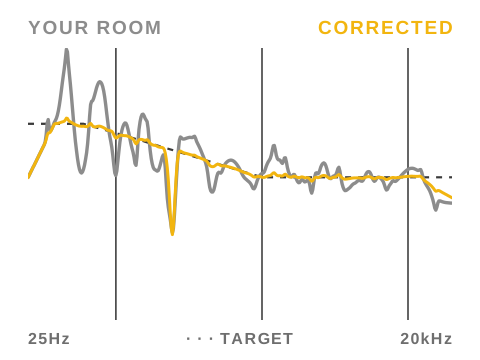
The established room correction products solve different problems and suit different systems, and comparing them by approach is more useful than ranking them. Dirac Live is the turnkey choice for hi-fi and AV hardware. Trinnov Optimizer is the deepest and most expensive, bound to its own processors. Sonarworks SoundID Reference is the simple path for studio monitor and headphone calibration on a computer. Audiolense and Acourate are FIR design environments for people who want to engineer the correction themselves. REW is the free measurement standard that pairs with a separate DSP. IK ARC Studio puts the correction in a small hardware box, and Clearroom is a Mac plugin. Omnissiah is Tantrum's approach, live coherence-weighted measurement with minimum-phase IIR correction and time alignment, running on the computer with any interface or inside Tantrum's DSP hardware. It is our product, so weigh the declared interest, and on the criteria this guide applies it is the strongest combination here.
How to Compare Them
Ranking correction products in one list hides the decisions that matter. The useful axes are the ones from the choosing guide: whether the product time-aligns sources or only equalises, whether it corrects with minimum-phase IIR or linear-phase FIR and with what latency, how it measures, and whether the filters run on a computer or in hardware. The table below places each product on those axes, and the sections after it describe each one honestly, including ours.
| Product | Measurement | Filters | Runs on | Best fit |
|---|---|---|---|---|
| Dirac Live | Multipoint swept sine | Mixed-phase FIR | AV receivers, processors, miniDSP, computer | Turnkey hi-fi and home cinema |
| Trinnov Optimizer | Proprietary 3D microphone, multipoint | FIR and IIR, time and phase optimisation | Trinnov processors only | High-end cinema and installation |
| Sonarworks SoundID Reference | Guided 37-point swept sine | Linear-phase, mixed and zero-latency modes | Computer (system-wide driver or plugin) | Simple studio monitor and headphone calibration |
| Audiolense | Swept sine | FIR, including crossover and time-domain correction | Computer with convolution playback | DIY FIR engineering on Windows |
| Acourate | Swept sine | FIR toolbox with full manual control | Computer with convolution playback | Maximum-control DIY on Windows |
| IK ARC Studio | Guided multipoint with the supplied microphone | Not published | ARC Studio hardware processor | Correction for every source without a computer in the path |
| Clearroom | Swept sine | Hybrid FIR with no added latency | Mac plugin (AU, VST3, AAX) | Mac studio correction inside the DAW |
| REW | Swept sine and RTA, free | Generates parametric EQ settings | Exports to any EQ or DSP | Measurement and analysis on any budget |
| Omnissiah | Live pink-noise transfer function with coherence weighting | Minimum-phase IIR plus measured time and level alignment | Computer with any interface, or Tantrum DSP hardware | Studio correction with alignment, no pre-ringing and no added latency |
The Turnkey Options: Dirac Live and Trinnov
Dirac Live is the most widely deployed serious correction, licensed into AV receivers and processors and available with miniDSP hardware and as a computer application. It measures multiple positions with swept sines and builds mixed-phase FIR filters that address timing as well as magnitude, and its Bass Control add-on manages multi-subwoofer alignment properly. It is genuinely good at what it does. The costs are the FIR trade-offs, latency that varies with platform, filter resolution bounded by the host hardware, and per-platform licensing that adds up.
Trinnov Optimizer is the deepest commercial implementation, measuring speaker positions in three dimensions with its own microphone and working explicitly on amplitude, phase and group delay per speaker. It only runs inside Trinnov's processors, which start at several thousand pounds and climb steeply. For large multichannel rooms and installations it has little competition. For a stereo studio it is a lot of processor for the job, and the correction philosophy still leans on long FIR filters with the latency that brings.
On the Computer: Sonarworks, Clearroom, Audiolense, Acourate and REW
Sonarworks SoundID Reference is the lowest-effort route for studio monitors and the de facto standard for headphone correction profiles. A guided 37-point sweep produces a correction that runs system-wide or as a plugin. Its linear-phase and mixed modes carry real latency, and its zero-latency mode is minimum-phase filtering, which is the mode to use while tracking. It equalises but does not time-align a subwoofer to the speakers, and everything runs on the computer, so only the computer's output is corrected.
Clearroom is a newer Mac product that runs as an AU, VST3 or AAX plugin. Its filter is a hybrid FIR that its maker says adds no latency to the monitoring path. If the measurement finds the two speakers out of step it offers to align their timing and polarity. By its own FAQ it does no phase correction, bass management or multi-subwoofer integration, and as a plugin it corrects only what passes through the DAW.
Audiolense and Acourate are Windows applications for people who want to design the correction rather than receive it. Both build long FIR filters from sweep measurements and support crossover design and time-domain correction, played back through a convolution engine. In skilled hands they produce excellent results, and they demand the skill. Latency is whatever the filter length implies, which makes them playback-system tools rather than tracking-room tools.
REW is free, universal and the measurement standard for a reason. It measures with sweeps and real-time analysis, and generates parametric EQ corrections you export to whatever DSP you own, from a miniDSP to a monitor's built-in filters. It does not apply anything itself and its automatic filter generation is deliberately conservative, so it pairs best with someone willing to read the measurements. As a companion to any product on this page it is essential.
In a Box: IK ARC Studio
ARC Studio is IK Multimedia's hardware answer. You measure with the supplied microphone and ARC software on the computer, and the correction then runs in a small processor between the interface and the monitors. That puts it in the hardware camp: every source through the box is corrected, and nothing depends on the computer once it is calibrated. IK does not publish the filter type or the box's latency, so measure the round trip yourself if you track through it.
Omnissiah
Omnissiah is Tantrum Audio's correction and control application for macOS, and it makes different choices from everything above. Measurement is a live pink-noise transfer function rather than a captured sweep, averaging continuously with coherence weighting so the software knows which parts of the measurement to trust and you can measure a realistic listening area rather than a frozen point. Correction is minimum-phase IIR, matching the minimum-phase nature of correctable room anomalies with no pre-ringing. Time alignment between subwoofer and speakers is computed from the corrected responses, so the phase behaviour of the correction filters is absorbed into the alignment rather than left in the crossover region.
The filters run in either of two places. On the computer, Omnissiah corrects any speakers through any audio interface, and because the correction is IIR it adds no filter latency on top of the interface's own. With Tantrum's DSP monitors and subwoofers, the same calibration is written into the hardware itself, so every source is corrected, nothing depends on the computer being awake, and the playback path gains no latency at all.
Omnissiah is our product, and this is our comparison, so weigh that as you read. The reason it leads on this page is that the page's criteria are the ones it was built around: measured time alignment between every source, computed on the corrected responses, minimum-phase IIR with no pre-ringing and no latency penalty, a measurement that knows which of its own data to trust, and a choice between computer and hardware deployment that nothing else here offers in one product. What the others hold over it is maturity and breadth, Dirac and Trinnov in multichannel, Sonarworks in headphone profiles, Acourate and Audiolense in FIR design freedom. For stereo and sub studio monitoring judged on correction quality, we think the criteria decide it.
What They Cost
List prices as of October 2026. All of them discount often, so treat these as the ceiling.
| Product | Price | What you get |
|---|---|---|
| REW | Free | Measurement and filter suggestions. You supply the EQ. |
| Omnissiah | £59 | One-off purchase, updates included, any interface on a Mac. |
| IK ARC Studio | About £210 | Hardware processor, microphone and software. |
| Clearroom | $215 ($165 introductory) | Mac plugin. Rent-to-own also offered. |
| Sonarworks SoundID Reference | About £249 with microphone | Speakers and headphones, system-wide app and plugin. |
| Dirac Live for Studio | $349 to $499 | Computer application. The higher price adds Bass Control for subwoofers. |
| Trinnov | Several thousand pounds | Only sold inside Trinnov processors. |
Checks Worth Running Before You Commit
Most correction products have trial periods. These checks separate them faster than reading specifications.
- 1Measure the room first with free software so you know what the problems are before any product tells you.
- 2Check the correction at more than one seating position. A correction that is excellent at one point and poor 30 cm away is of limited use.
- 3Look at what it did in the low end. If it applied a large boost into a deep null, that is headroom spent on a problem that cannot be fixed electrically.
- 4Measure the latency if you record while monitoring. Linear-phase FIR correction can add enough delay to make tracking uncomfortable.
- 5Listen to a familiar reference track before and after, at a moderate level, and check whether the improvement survives at low volume.
Rules of Thumb
Frequently Asked Questions
What is the best room correction software?
There is no single best. Dirac Live is the strongest turnkey option on AV hardware, Trinnov the deepest at high-end prices, Sonarworks the simplest studio calibration on a computer, Audiolense and Acourate the DIY engineering environments, REW the free measurement standard, and Omnissiah the strongest match for the criteria this guide applies, running on any interface on the computer or inside Tantrum DSP hardware. The right one depends on your sources, latency needs and where the filters can run.
Which room correction options are free?
REW is free and generates parametric EQ corrections you can load into any DSP you already own. Everything else here is paid, though correction built into hardware you were buying anyway, like Dirac in a receiver or Omnissiah with Tantrum monitors, costs nothing extra.
Which products time-align a subwoofer to the speakers?
Dirac Live with Bass Control, Trinnov, Audiolense, Acourate and Omnissiah handle subwoofer alignment as part of correction. Sonarworks does not. Clearroom aligns the two main speakers but not a subwoofer. REW measures the misalignment but leaves fixing it to your DSP.
Which has the lowest latency?
Correction running as minimum-phase IIR adds effectively nothing, which is Omnissiah's arrangement in both modes: in Tantrum hardware the playback path gains no latency at all, and on the computer no filter latency stacks on the interface's own. Linear-phase and mixed FIR products add anywhere from a few milliseconds to over a hundred depending on filter length and platform. Sonarworks' zero-latency mode exists precisely because its other modes cannot be tracked through.
Does any of this work without a computer in the playback path?
Correction inside AV receivers, Trinnov processors, miniDSP units and Tantrum's DSP hardware runs standalone once calibrated. Sonarworks, Audiolense, Acourate, REW-generated corrections applied in software, and Omnissiah's computer mode all need the computer in the path.
Can Omnissiah correct third-party speakers?
Yes. Omnissiah runs on the computer and corrects any speakers through any audio interface, with the same live measurement, IIR correction and alignment. With Tantrum's DSP monitors and subwoofers the calibration is additionally written into the hardware, where it corrects every source with no computer in the path.
Is Dirac Live worth it over an AVR's built-in correction?
Over basic built-in systems, usually yes. Its multipoint measurement and mixed-phase filters outperform most legacy auto-calibration. Many receivers now ship with Dirac built in, in which case the question answers itself.
How much does Dirac Live cost?
Dirac Live for Studio, the computer version, costs $349 to $499 as of October 2026, with the higher price adding Bass Control for subwoofers. In AV receivers and processors it is either built in or sold as a licence upgrade for that one device.
How many measurement positions do I need?
Enough to cover the area you actually use, typically five to nine spread over the space your head occupies. One measurement at one exact point produces a correction valid only there, and moving slightly can make things worse.
Can I use any measurement microphone?
Most products accept any measurement microphone, and Omnissiah works with any mic and any interface. Sonarworks and ARC are sold with their own microphones. Whichever you use, load its calibration file, because an uncalibrated capsule puts its own errors into the correction.
What is the 38% rule?
A starting point for where to sit in a rectangular room: about 38% of the room's length from the front wall. It keeps your head off the midpoint, where the first length mode cancels, and away from the back wall, where every length mode peaks. Treat it as a first guess and measure, because room modes depend on all three dimensions, not one.
Do I still need REW if I buy one of the commercial products?
It is worth having regardless. An independent measurement of the corrected result is the only way to verify any product's claims in your room, and REW is the standard tool for exactly that.
Conclusion
Match the product to the system rather than the reviews. Sources and latency requirements narrow the field fastest: computer-only playback opens up the software products, tracking rules out long FIR latency, and multiple analogue sources demand correction in hardware. After that, the choosing guide's criteria apply, alignment capability first, filter philosophy second, and Omnissiah is the product here built around exactly those criteria, on the computer for any system and in the hardware on Tantrum's. Every product here can improve an untreated system's measurements. The differences that persist are latency, transient behaviour and how much of the improvement survives outside the exact microphone position.
Glossary
- Mixed-phase filter
- A filter combining minimum-phase and linear-phase behaviour, correcting some timing errors while limiting pre-ringing. Used by Dirac Live.
- Convolution engine
- Playback software or hardware that applies long FIR filters, required by Audiolense and Acourate corrections.
- System-wide driver
- A virtual audio device that routes all of a computer's output through correction, as Sonarworks uses.
- Coherence weighting
- Using the measured coherence between test signal and microphone to decide which frequency bands of a live measurement are trustworthy.
- Bass Control
- Dirac Live's add-on for measuring and aligning one or more subwoofers with the main speakers.
Sign up to hear more when we release something new


