


Best Distortion Plugins for Drums
Distortion on drums is asked to do four separate jobs: add weight, add attack, add grit, and glue a kit together so it sounds like one instrument in one room. Different plugin families are good at different ones, which is why the question of the best distortion plugin has no single answer. This guide separates the jobs, sets out what tape, valve, transistor, bitcrush and speaker-breakup emulations each do to a drum sound, and gives the practical routing that keeps distortion from eating the transients you were trying to sharpen.
The Four Jobs
Nearly every use of distortion on drums is one of four things, and naming which one you are doing makes the plugin choice fall out.
Weight. You want the kick and the low end of the snare to feel bigger without raising the level. Gentle asymmetric saturation adds harmonics above the fundamental, which the ear reads as more bass because it reconstructs the missing low end from the series above it. This survives on small speakers, where the fundamental does not.
Attack. You want the stick to cut through. Here distortion works by compressing the peak and lifting what sits underneath it, so the transient becomes denser rather than louder. Hard clipping does it most efficiently and costs you the most in naturalness.
Grit. You want texture: the sound of a kit that was recorded badly on purpose. Bitcrushers, sample-rate reduction and speaker-breakup emulations all live here, and they are the ones that change the character rather than the balance.
Glue. You want the overheads and the close microphones to belong to the same event. Running the whole bus through one gentle non-linearity makes everything share the same distortion products, which is a substantial part of what makes a kit sound like a kit.
What Each Family Does to a Kit
| Family | What it does | Best job |
|---|---|---|
| Tape emulation | Soft saturation with high-frequency loss and some compression | Glue, and taming harsh cymbals |
| Valve emulation | Asymmetric soft clipping, even harmonics, gradual onset | Weight on kick and snare |
| Transistor and op-amp | Harder knee, odd harmonics, more aggressive | Attack, and room microphones |
| Bitcrush and sample-rate reduction | Aliasing and quantisation noise, not harmonic in the usual sense | Grit, as an effect rather than a treatment |
| Speaker and cone breakup | Resonant midrange, cabinet colouration, mechanical failure sounds | Character, and making a clean sample sound played |
| Wavefolders | Complex high harmonics that rise steeply with drive | Sound design, rarely a mix tool |
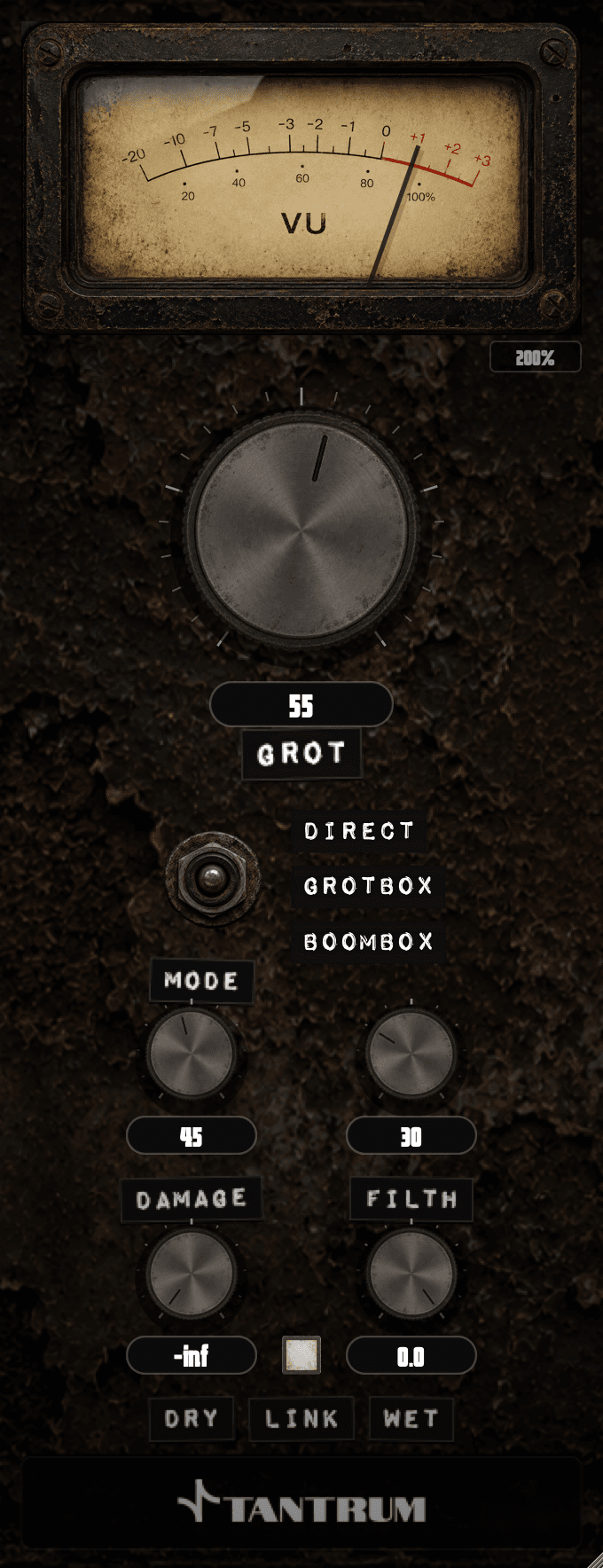
The speaker-breakup group is worth separating out, because it is the only one modelling a mechanical failure rather than an electrical one. A driver pushed past its excursion limit produces a resonant, midrange-forward sound with the character of the cabinet around it, and that is audibly different from clipping an amplifier. Our own GROT is in this group, with direct, cabinet and boombox modes and separate damage and filth controls.
Routing and Setting
The routing decision matters more than the plugin choice, and it is where most drum distortion goes wrong.
- 1Use a parallel send for anything aggressive. Blend the distorted signal under the clean one so the original transient survives intact.
- 2Filter the send. High-passing what you feed the distortion stops the kick dominating the harmonics generated for the snare.
- 3Set the drive by ear at the blend level you will actually use, not solo. Distortion always sounds better in solo than it does in the mix.
- 4Put gentle glue on the bus in series, at a level where bypassing it is only just audible.
- 5Check on a small speaker. Added harmonics are exactly what small speakers reproduce, so distortion decisions translate differently from EQ ones.
- 6Re-check the level match. Distortion raises loudness, and every A and B comparison at different levels favours the louder one.
Common Misconceptions
Distortion on drums means making them sound distorted.
Most drum distortion is inaudible as distortion. It is generating harmonics that change perceived weight and attack, and the point is usually that you notice the drums rather than the effect.
More drive means more character.
Past a certain point drive removes the dynamic range that made the kit sound played. The controls that change character are the mode, the filtering and the blend; drive mostly changes how much.
Analogue emulations are more musical than digital ones.
They model different things. A bitcrusher is not trying to be a valve, and on a hip-hop kit an aliasing artefact may be exactly the sound. The distinction that matters is what is being modelled, not whether the original was analogue.
Frequently Asked Questions
Should distortion go before or after compression on drums?
Usually after, so the compressor sets the dynamics and the distortion colours a controlled signal. Putting distortion first changes what the compressor reacts to, which is a legitimate choice for aggressive sounds and harder to predict.
What is parallel distortion on drums?
Sending a copy of the drums to a distortion on an auxiliary channel and blending it under the clean signal. The clean path keeps the transient, the distorted path adds weight or grit, and the blend control sets how much.
Which distortion type is best for kick drums?
Soft asymmetric saturation of the valve type, for weight, applied in parallel and filtered so it works on the body rather than the click. Harder clipping suits the attack, which is a separate send with different filtering.
Do I need a distortion plugin if my DAW has one?
Not necessarily. Stock saturation covers weight and glue in most DAWs. What stock plugins usually lack is the speaker and cone-breakup family, which produces a character that cannot be reached by saturating and equalising.
Why do my drums sound smaller after adding distortion?
Almost always because it is in series rather than parallel, so the transient is being compressed away along with everything else. Move it to a send, blend it under the clean signal, and match the levels before judging.
Conclusion
Choose a distortion plugin by which of the four jobs you are doing and which physical behaviour it models, then spend the effort on routing rather than on the drive control. Parallel for anything aggressive, filtered sends, gentle series glue on the bus, and level-matched comparisons. The limit worth stating: distortion adds harmonic information and cannot put back a transient a compressor already removed, so it belongs after the dynamics are behaving rather than instead of fixing them.
Glossary
- Asymmetric clipping
- Clipping that treats the positive and negative halves of the waveform differently, generating even-order harmonics. Heard as added weight and warmth rather than as aggression.
- Cone breakup
- The region where a loudspeaker cone stops moving as one piece and flexes, producing resonant peaks and a midrange-forward character. A mechanical behaviour rather than an electrical one.
- Parallel processing
- Blending a processed copy of a signal under the unprocessed original, so the effect is added without replacing what was there.
Sign up to hear more when we release something new


