Tantrum Audio logo

GROT UserΒ Manual

Every control explained, from the first insert to the panel hidden behind the meter. Written for GROT v0.1.1.

All chapters
Getting started
3

Quick start

Open page β†—

Five minutes, one drum loop, and you'll know what every knob does. Put GROT on a drum bus or a loop, something with transients, and play it in a loop while you work through this.

What happens the moment you insert it

GROT is not clean on insert. Out of the box the MODE switch sits on GROTBOX, WET is at 0.0 dB and DRY is at -inf, so you are hearing the small-speaker voicing and nothing else: the signal is band-limited to roughly 320 Hz–3.2 kHz and pushed forward in the mids.

The three degradation knobs (DAMAGE, GROT and FILTH) all start at zero. The speaker is cheap, but it isn't broken yet.

Tip

If the immediate band-limiting isn't what you want, flick MODE to DIRECT. That removes the cabinet entirely and leaves the signal full-bandwidth, with every other control still working.

1. Break the cone

Turn DAMAGE up to about 45.

The mids start to crumble first, then the top begins to rasp, and the whole thing develops a slow uncertainty: the drive level wanders at around 3 Hz, so the speaker never sounds settled. Somewhere past 40 you'll start hearing a mechanical flam a few milliseconds behind each hard transient: that's the loose driver slapping.

Sweep DAMAGE slowly from 0 to 100 once, and listen for the three stages: crunch, then the slap and the tearing buzz, then the whole driver failing in the last third.

2. Push it into strain

Turn the GROT knob, the big one, up to about 30.

This is the sound of a speaker being driven harder than it was built for. The low mids compress, a bark resonance rises in the middle of the band, and the whole thing gets denser and angrier without simply getting louder.

Above 50 a second layer arrives: a bright, fizzy chainsaw saturation that adds serious bite. Try it, then come back down.

3. Add the neglect

Turn FILTH to about 20.

Now the speaker is dirty as well as broken: a low-mid noise floor that opens whenever signal is flowing, occasional crackle from corroded contacts, and a grainy digital corruption underneath. FILTH is the only control that adds something that wasn't in your signal.

4. Choose how much of it you want

DRY and WET are two independent output levels rather than one blend knob. Right now DRY is muted and WET is at unity, so you're hearing the wreckage on its own, a full insert.

To use GROT in parallel instead, bring DRY up to about -6.0 and pull WET down to taste. The two paths are sample-aligned, so there's no phase weirdness in the sum.

The panel at the settings from this chapter

5. Watch the meter

The VU meter at the top isn't an output meter. It reads damage done: how much of what's coming out was not in what went in. At 100% the change is as large as the original signal. In the red, GROT is putting out more junk than signal.

Use it to compare settings honestly, especially when the auto-gain has made two very different settings sound similar in level.

Where to go next

Watch out

Big moves of DAMAGE and the GROT knob change output level as well as tone. There's an internal level match, but it's deliberately slow and it doesn't catch everything. Keep your monitors low while you explore.

↑ Back to top
Getting started
0

About this manual

Open page β†—

This manual covers GROT 0.1.1, the speaker-degradation plugin from Tantrum Audio, for macOS in AU, VST3 and AAX formats.

Who it's for

You mix, produce or sound-design, and you want to know exactly what each control is doing so you can reach for the right one instead of turning knobs until something happens. No DSP background is assumed. Where a number helps (a crossover point, a resonance, a threshold) it's given, because on a distortion box those numbers change what you reach for next.

How it's organised

  • Getting started: what GROT is, how to install it, and the shortest route to a usable sound.
  • The controls: one chapter per control on the front panel, in the order they appear: MODE, DAMAGE, GROT, FILTH, DRY and WET.
  • Advanced: the hidden panel behind the meter (input staging and sidechaining), and a set of worked settings for real material.
  • Help & reference: troubleshooting, a glossary, the full parameter table, specifications and support.

If you only read one chapter, read the quick start. If you only read two, read the quick start and MODE.

Conventions

  • DAMAGE, GROT, WET and so on are controls on the panel, spelled exactly as the panel spells them.
  • Knob positions are given as percentages, matching the number the panel shows. "DAMAGE at 45" means the readout under the DAMAGE knob reads 45.
  • DRY and WET are level controls and read in decibels, where -inf means fully muted and 0.0 means unity.
Note

The word GROT means two things and the manual keeps them apart. GROT is the plugin. The GROT knob is the control in the middle of the panel that drives the speaker into strain.

Safety

GROT is a distortion. It generates harmonics and noise that were not in your source, and at high settings it can be substantially louder than the signal you fed it.

Watch out

Turn your monitors down before you first insert GROT and before any large move of DAMAGE or the GROT knob. Both change output level as well as tone. Never audition extreme settings on headphones at working volume.

The processing is entirely internal. GROT does not write to disk, does not phone home, and cannot damage your speakers other than by the ordinary route of being played too loud.

↑ Back to top
Getting started
1

What GROT is

Open page β†—

GROT is a plugin that plays your audio through a broken speaker. Not a modelled cabinet, not an impulse response of a good speaker in a good room. A cheap box whose cone is torn, whose surround is loose, whose contacts are corroded and whose voice coil is about to bottom out.

The idea

Most distortion plugins are circuits: a tube, a transistor, a clipper. GROT is a mechanical system. Everything it does is something physically going wrong at the point where electricity becomes air:

  • the cone loses control and develops its own resonances;
  • a loose driver slaps a few milliseconds after a hard transient;
  • a slashed cone buzzes against its own cut edges, and jams;
  • a voice coil hits its excursion limit and knocks on the back plate;
  • grime and corrosion add hiss and crackle whether you asked for it or not.

That distinction matters in use. A circuit distortion sounds the same whatever you play through it. A mechanical one is program-locked: it responds to how hard and how low you hit it, it stays quiet when you stay quiet, and it falls apart in a way that follows the performance instead of sitting over the top of it.

What's on the panel

Four controls do the work, and two set the blend.

ControlWhat it breaks
MODEWhich speaker you're playing through: none, a small mid-forward box, or a big ported one
DAMAGEMechanical cone breakup: instability, resonance, driver slap, tearing, terminal failure
GROTLow-mid strain: what a speaker does when it's driven far harder than it was built for
FILTHNeglect: noise floor, crackle and digital corruption that are there whatever you play
DRY / WETTwo independent output levels, so parallel use is a first-class option

Behind the VU meter there's a hidden panel with input gain, a spectral tilt, and a sidechain that lets another track drive the destruction. Chapter 10 covers it.

What it is not

  • Not a cabinet simulator. GROT will not make a DI'd guitar sound like a well-recorded amp. It will make it sound like it's coming out of something that should have been thrown away.
  • Not an impulse response loader. There are no IRs and nothing to load.
  • Not subtle by default, though it can be. With DRY and WET as separate levels, GROT is as usable as a parallel colour stage as it is as a wreck-everything insert.

What you'll use it on

Drum busses that are too clean and too polite. Synths that need to sound like they came out of something with a handle on it. Vocals that need to fall apart on one line. Bass that needs to be audible on a phone. Whole mixes, in parallel, when the arrangement is fine and the sound is boring.

Chapter 11 has worked starting points for each of those.

↑ Back to top
Getting started
2

Installation

Open page β†—

GROT ships as a signed, notarised disk image containing every format. You drag the format your DAW uses into the matching folder, and that's the whole install.

What you need

  • macOS 11.0 or later
  • An Apple Silicon (arm64) Mac
  • A DAW that hosts AU, VST3 or AAX plug-ins

Getting the installer

Your purchase or access code entitles you to a download link. Enter the code at tantrumaudio.co.uk/downloads/grot and the link is emailed to you. Keep that email, because the same link serves updates.

The file is GROT-0.1.1.dmg.

Installing

  1. 1Open GROT-0.1.1.dmg. The window shows the plug-in bundles alongside shortcut folders pointing at the standard install locations.
  2. 2Drag GROT.component onto AU Plug-Ins, for Logic Pro, GarageBand, and anything else that hosts Audio Units.
  3. 3Drag GROT.vst3 onto VST3 Plug-Ins, for Ableton Live, Cubase, Reaper, Studio One, Bitwig and most other hosts.
  4. 4Drag GROT.aaxplugin onto AAX Plug-Ins, for Pro Tools.
  5. 5Enter your admin password when macOS asks. These are system-wide folders, so it will.
  6. 6Eject the disk image.

You only need the format your DAW actually uses. Installing all three is harmless if you're not sure, and is what most people should do.

Note

GROT is signed with a Tantrum Audio Developer ID and notarised by Apple, and the notarisation ticket is stapled to the disk image. It should install without any Gatekeeper warning at all. If macOS does complain that the developer cannot be verified, the download is incomplete or corrupted. Re-download rather than overriding the warning.

Where the files end up

FormatLocation
AU/Library/Audio/Plug-Ins/Components/GROT.component
VST3/Library/Audio/Plug-Ins/VST3/GROT.vst3
AAX/Library/Application Support/Avid/Audio/Plug-Ins/GROT.aaxplugin

Note the leading /Library: that's the system-wide library at the root of your disk, not the ~/Library inside your home folder.

Making your DAW find it

Logic Pro / GarageBand. Logic validates new Audio Units at launch. If GROT doesn't appear under Audio Units β†’ Tantrum Audio, open Logic Pro β†’ Settings β†’ Plug-in Manager, find GROT and click Reset & Rescan Selection.

Ableton Live. Settings β†’ Plug-Ins, make sure Use VST3 Plug-In System Folders is on, then click Rescan.

Pro Tools. AAX plug-ins are picked up at launch. Restart Pro Tools after installing.

Everything else. Rescan your plug-in folders from your host's preferences. Most hosts only scan at startup, so a restart usually does it.

Updating

Install the new version exactly the same way and let it replace the old files. Sessions keep their settings, because parameters are stored by name and every version of GROT reads earlier sessions.

Tip

Logic caches Audio Units aggressively and will keep using a stale copy if one is still installed. If an update doesn't seem to have taken, check that there isn't an older GROT.component left somewhere else on the system, then rescan in the Plug-in Manager.

Uninstalling

Delete the files listed in the table above. GROT installs nothing else: no preference files, no support folders, no background processes.

↑ Back to top
Getting started

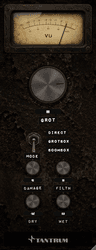
GROT is a tall, narrow channel strip that reads top to bottom in signal order. Everything is on one page. There are no tabs, no menus and nothing to scroll.

Top to bottom

The GROT panel
PositionControlWhat it is
TopVU meterDamage done: how far the output has moved from the input
Below itGROTThe hero knob: low-mid strain
MiddleMODEThree-position lever: DIRECT, GROTBOX, BOOMBOX
Lower pairDAMAGE / FILTHCone breakup and neglect
Bottom pairDRY / WETTwo independent output levels

The order on the panel is not the order of the signal chain. The GROT knob is at the top because it's the one you reach for most. The actual chain runs input β†’ MODE β†’ DAMAGE β†’ FILTH β†’ GROT β†’ limiter β†’ DRY/WET sum, and is set out in full in Appendix B β€” Specifications.

The meter

The VU meter

This is a real VU, with the 300 ms averaging ballistic that implies. It will not show you peaks and it isn't trying to. What it reads is unusual: not output level, but the size of the difference between output and input, relative to the input.

  • Below 100%: the processing is a colouration. Most of what you're hearing is still your signal.
  • At 100%: the change GROT has made is as big as the signal it was given.
  • In the red: GROT is generating more than it was handed.

Because DRY and WET don't affect it, the meter tells you how hard the processing is working regardless of how much of it you've mixed in.

Tip

The meter is also a door. Click it and it swings away to reveal a hidden panel with input gain, tilt and the sidechain controls. Click the cavity's background to put the meter back. Chapter 10 covers what's in there.

Reading and typing values

Every knob shows its value underneath. The three degradation knobs read 0–100. DRY and WET read in decibels, where -inf is silence and 0.0 is unity.

  • Drag a knob vertically or horizontally to change it, or use the scroll wheel over it.
  • Double-click the readout to type an exact value, then press Return.
  • Hold ⌘, βŒ₯ or βŒƒ while dragging to switch to velocity-sensitive mode, where a slow drag makes much finer changes than a fast one.

Resizing

The panel is resizable and keeps its proportions. There are two ways to do it:

  • Click the small percentage chip below the meter's right-hand corner and pick Small (70%), Medium (85%) or Large (100%). Right-clicking anywhere on the background opens the same menu.
  • Drag the bottom-right corner of the window.

Your chosen size is stored with the plug-in, so it comes back the same way in that session and in new instances.

Note

Logic honours the size menu but not corner-dragging on Audio Unit windows. If dragging the corner does nothing, use the chip.

The first time you open GROT it sizes itself to your display, as large as fits the screen height, capped at 100%.

Automation

Every control is automatable, and every continuous control is smoothed so automation doesn't produce zipper noise or clicks: 80 ms on DAMAGE, GROT and FILTH, 30 ms on DRY, WET, GAIN and TILT. Filter coefficients are recalculated every 32 samples internally rather than once per host block, which is why fast knob moves stay clean.

MODE and the sidechain switch are discrete: they change instantly, with no crossfade. Automate them in a gap if you don't want to hear the join.

↑ Back to top
The controls
5

MODE β€” choosing the speaker

Open page β†—

MODE picks the box you're playing through. It's the most consequential control on the panel, because it doesn't only change the tone: it changes how every other control behaves.

The three positions

The MODE switch

Three positions, selected with the lever: DIRECT at the top, GROTBOX in the middle, BOOMBOX at the bottom. GROTBOX is the default.

DIRECT

No cabinet at all. The signal keeps its full bandwidth and no enclosure resonances are imposed.

Everything else still works: DAMAGE still tears the cone, the GROT knob still produces strain, FILTH still adds its noise floor. What you lose is the band-limiting and the box's own resonant character, and the gentle top-end sheen that GROT restores to the two speaker voicings, which DIRECT doesn't need.

Use DIRECT when the source already has a cabinet sound of its own, when you're degrading a full mix and can't afford to lose the extremes, or when you want the mechanics without the small-speaker tone.

GROTBOX

A tiny, cheap, mid-forward box, the sort bolted to a PA column or rattling around in a practice combo.

PropertyGROTBOX
Bandwidthroughly 320 Hz – 3.2 kHz
Resonances245 Hz, 1.1 kHz, 2.6 kHz
Driver slaphigh and tight (315 Hz / 630 Hz), and boosted so it cuts through
Characterhonky, forward, aggressive

The three resonances aren't fixed. As DAMAGE rises they get both louder and narrower, because a cone losing control doesn't just ring, it rings for longer. That's most of what makes GROTBOX the nastiest of the three modes.

GROTBOX also reacts hardest to the GROT knob. It's modelled as the smallest enclosure, and small enclosures get angry soonest, so the same GROT setting bites more here than anywhere else.

Use it on drums, on anything that needs to sound like it's coming out of a phone or a laptop, and whenever you want the transient slap to be obvious.

BOOMBOX

A big ported enclosure with far too much low end and a dull top.

PropertyBOOMBOX
Bandwidthroughly 45 Hz – 4.5 kHz
Port resonance65 Hz, high Q, already +7.5 dB and swelling further with DAMAGE
Mid presence720 Hz, so the sound doesn't disappear
Driver slapdeep and slow (63 Hz / 126 Hz)
Characterheavy, boomy, dark

The port is the whole point. It sits right where kick drums and bass live, it rings hard, and as DAMAGE increases it rings harder and longer until the woofer feels like it's on the edge of excursion.

BOOMBOX also drives the cone breakup harder than the other modes: DAMAGE is scaled up by 40% here, on the reasoning that a big cone gets flogged more for the same input. Expect the same DAMAGE setting to sound noticeably more broken in BOOMBOX than in GROTBOX.

Use it on bass, on kicks that need to feel oversized, and on anything you want to sound like it's being played through the back of a van.

Choosing between them

If you wantUse
Degradation without a speaker soundDIRECT
Small, cheap, honky, aggressiveGROTBOX
Big, boomy, dark, oversizedBOOMBOX
The most obvious transient slapGROTBOX
The most low-end weightBOOMBOX
The most extreme response to the GROT knobGROTBOX
The most extreme response to DAMAGEBOOMBOX
Note

MODE is a discrete switch with no crossfade. Changing it mid-audio is instantaneous and can click, because the cabinet filters change state in one sample. Automate it during a gap or on a transient.

Tip

If DAMAGE sounds too clean, change MODE before you turn DAMAGE up. The same amount of breakup is far more audible through GROTBOX's narrow, resonant band than through DIRECT's full bandwidth.

↑ Back to top
The controls
6

DAMAGE β€” breaking the cone

Open page β†—

DAMAGE is mechanical destruction of the driver. It is not a drive control with a distortion curve: it's a sequence of physical failures that arrive in order as you turn it up, and each one behaves differently depending on what you play into it.

What's happening underneath

DAMAGE and FILTH

The signal is split into three bands (below 250 Hz, 250 Hz to 2 kHz, and above 2 kHz) and each is driven through its own asymmetric speaker-like shaper. The split is subtractive, so with DAMAGE at zero the bands sum back to exactly the original signal and there are no crossover artefacts to hear.

On top of that, DAMAGE controls five separate things that arrive at different points on the knob.

The stages, in the order they arrive

From zero: instability and tearing

Two things start immediately.

A slow random wobble, around 3 Hz, modulates how hard each band is being driven, so the speaker never sounds settled. It's scaled hard at the bottom of the knob, near-silent at low settings, and only really stirs once you push in.

And the torn cone starts to work. This is a modelled flap of slashed paper whose cut edges swing freely one way and jam against each other the other way, driven by the cone's own excursion. Crucially it doesn't add a sound: it modulates your signal, so the buzz is your own note rectified and choked. Quiet passages stay clean, loud ones tear up, and silence stays silent.

From about 40: the driver slap

Past 40 a mechanical flam appears on hard transients: the loose driver physically slapping about 10 ms behind the hit, rung through deep cone resonances.

It only fires on genuine transient onsets, and there's a 60 ms lockout after each one so it never degenerates into a flutter. It stays a physical event rather than an effect.

The slap follows MODE: high and tight in GROTBOX (315 Hz / 630 Hz, and boosted so it cuts through that box's mids), deep and slow in BOOMBOX (63 Hz / 126 Hz).

From about 60: terminal failure

The last part of the knob is the driver dying. The voice coil starts slamming into a shrinking excursion limit and knocking on the back plate, and the cone begins flapping an octave down, the flabby, motorboat blat of a blown woofer, with the radiation cutting out intermittently as it goes.

Like the tearing, all of it is derived from your signal. Nothing free-runs. Push nothing through it and it makes no noise at all.

Throughout: losing the top and finding its own resonances

Across the whole range the high end progressively collapses, and the broken cone develops two resonances of its own, a low-mid honk around 340 Hz and an upper-mid rattle around 1.6 kHz, that get both louder and narrower as the damage worsens. These live in the cone, not the box, so DIRECT mode gets them too.

How the knob is shaped

The travel is deliberately not linear in effect:

PositionWhat dominates
0–35Crunch: multiband breakup, slow instability, a first hint of tearing
35–60The driver slap arrives; the high end starts to rasp and collapse
60–100Terminal failure: bottoming, subharmonic blat, cut-out

The shaper drive itself plateaus around the middle of the knob. Past that point more crunch would just be harsher fizz, so the escalation is handed over to the tearing and terminal stages instead. The result is that the top of the knob reads as mechanical failure rather than more distortion.

What changes DAMAGE without you touching it

Two things push the effective damage beyond where you set the knob.

  • MODE. BOOMBOX scales the breakup up by 40%. The same setting is meaningfully more broken there than in GROTBOX or DIRECT.
  • The GROT knob. A speaker under strain also breaks down faster, so turning GROT up advances DAMAGE too, by up to about 18% of the knob's travel at full GROT. This affects the character stages as well as the drive, so pushing GROT can bring the slap and the terminal failure in earlier than the DAMAGE readout suggests.
Tip

If you want the slap without the crunch, keep DAMAGE just above 40 and use GROTBOX. If you want the crunch without the slap, stay below 40 and reach for the GROT knob instead.

Note

DAMAGE adds no noise. Everything it does is a consequence of the signal you feed it, so it goes quiet when your track does. Noise that persists in the gaps comes from FILTH.

↑ Back to top
The controls
7

GROT β€” driving it too hard

Open page β†—

The GROT knob is the big one at the top of the panel, and it's the control most people end up using most. Where DAMAGE breaks the speaker mechanically, GROT shows you what a working speaker does when it's driven far beyond what it was designed for: the low mids compress and bark, the whole thing gets denser, and eventually it screams.

What it does

The GROT knob

The 55 Hz – 2 kHz band is pulled out and put under increasing pressure. Three things happen to it together as the knob rises.

Compression. The threshold drops from βˆ’6 dB down to βˆ’30 dB and the ratio climbs to 8:1, so the low mids are squeezed harder and earlier the further you go. Up to 12 dB of makeup gain keeps the band from collapsing under it.

Saturation. The compressed band is driven through an asymmetric saturator, with the drive rising steeply across the knob's travel.

Bark. A resonance sweeps downward from 1.1 kHz toward 420 Hz and rises by up to 10 dB as you turn it up. This is the vocal, shouting quality the control is named for, and it's what makes GROT read as effort rather than as fuzz.

The low mids bite early by design, so you'll hear real strain well below the halfway mark.

Why it doesn't sound like a low-pass filter

Compressing and saturating a 55 Hz – 2 kHz band costs you top end. Left alone, the knob would behave like a slowly closing 1 kHz filter.

To stop that, an active high shelf at 1.3 kHz ramps in as you turn up, reaching about +13 dB at the 60% mark. Above 60% it eases back to around +4 dB, because by then the chainsaw layer is supplying its own brightness.

The practical consequence: GROT gets denser and angrier as you turn it up, but not darker.

Above 50: the chainsaw

Past the halfway point a second, parallel layer ramps in: a dense, smooth, presence-boosted saturation in the manner of an HM-2 pedal, with a +7 dB lift around 3.2 kHz and a lid at 10 kHz to keep it from turning harsh.

This is a genuine change of character, not just more of the same. Below 50 the knob is strain and bark. Above 50 it's strain and bark plus a bright, fizzy, mid-forward buzz on top. The top quarter of the range is extreme by design, and the drive keeps extending well past what the numbers on the knob suggest.

The travel, summarised

PositionCharacter
0–20Thickening. The low mids firm up and gain a little weight
20–50Real strain. Compression bites, the bark rises, the band gets dense
50–75The chainsaw arrives. Bright, fizzy, forward, obviously distorted
75–100Full scream. Drive extends far past nominal maximum

What it does to everything else

Tip

GROT feeds DAMAGE. A speaker under strain also fails faster, so turning this knob up advances the effective damage, up to about 18% of DAMAGE's travel at full GROT. If the slap or the terminal failure arrives earlier than the DAMAGE readout suggests, this is why.

MODE matters here too. GROTBOX is modelled as the smallest enclosure and responds most aggressively to GROT, while BOOMBOX is mid-sized and DIRECT is neutral. The same knob position is half again as strained through GROTBOX as through DIRECT, with BOOMBOX between the two.

Note

Because GROT both compresses and applies makeup gain, it raises average level as well as changing tone. The internal level match catches most of it, but if you're A/B-ing settings, trust the VU meter's damage reading rather than your impression of loudness.

↑ Back to top
The controls
8

FILTH β€” neglect

Open page β†—

DAMAGE and GROT are things you did to the speaker. FILTH is what happened to it while nobody was looking: a noise floor it can't get rid of, contacts that have corroded, and a signal path that has quietly lost resolution. It's the only control that adds something that wasn't in your signal.

Three layers

DAMAGE and FILTH

Grime

A continuous low-mid noise, band-limited to 150 Hz – 3.5 kHz with a honk around 1 kHz, then saturated for grit and tamed back down. It's modelled on the noise floor of an unmaintained console or a PA that's been in service far too long: dirty rather than hissy.

Grime is keyed to signal presence. It opens as soon as audio is flowing and closes in silence, over roughly 80 ms, with a slight level-dependent wobble so it isn't static. It is deliberately not a peak gate: it doesn't duck on transients and it doesn't pump.

Crackle

Sparse impulses with a fast decay tail: loose connections, dried-out contacts, a jack that needs cleaning. The rate rises with the FILTH setting and the timing is genuinely random, so it never falls into a pattern.

Corruption

A gentle, continuous loss of resolution. Bit depth is reduced smoothly from around 12-bit down to roughly 6- or 7-bit equivalent at maximum, then blended back at 25% strength. The result is a grainy, slightly compressed texture rather than the obvious stepping of a bitcrusher.

How the knob behaves

FILTH's response is quadratic: the bottom half of the travel barely does anything, and almost all of the effect lives in the top half. That's deliberate: it makes low settings usable as a texture rather than a commitment.

PositionWhat you get
0–30A faint layer under the signal; you'd miss it if you weren't listening
30–60Audible grime, occasional crackle, a slight grain on the top
60–100A gnarly, obvious noise floor that becomes part of the sound

Living with the noise

Note

FILTH is additive. At high settings with a quiet source it will be audible in the gaps between notes. That's the intended behaviour, because a filthy speaker hisses even when nothing is playing. If you need silence between phrases, automate FILTH down, or gate after GROT.

Because the grime is keyed to presence rather than level, it will not track a performance dynamically. It's either on with the signal or off in silence.

Tip

FILTH is the fastest way to make a too-clean digital source sound like it came off something physical, and it works with DAMAGE at zero. Try DIRECT mode, DAMAGE 0, GROT 0, FILTH 50 on a synth or a sampled instrument that sounds too new.

↑ Back to top
The controls
9

DRY and WET β€” blending and level

Open page β†—

GROT doesn't have a mix knob. It has two independent output faders, one for the untouched input and one for the processed signal, summed at the output.

Why two faders instead of one

DRY and WET

A single mix control forces the two paths to trade against each other: more wet always means less dry. Two faders let you do things a blend can't.

  • Full insert. DRY at -inf, WET at 0.0. This is the default.
  • Parallel. DRY at 0.0, WET wherever it sits best. The dry signal keeps its full level and you add wreckage underneath it, rather than replacing part of your track with it.
  • Wet only, quieter. DRY at -inf, WET at -6.0, when GROT is feeding something else downstream.
  • Off. Both at -inf. Silence, which is occasionally what an automation lane wants.

The controls

Both read in decibels from -inf to 0.0, where -inf means fully muted and 0.0 means unity gain. Neither can boost: this is a blend stage, not a gain stage. If you need more level out of GROT, use the GAIN control in the hidden panel (see Chapter 10) or trim after the plug-in.

The scale is skewed so the useful part of the range (the top 12 dB or so, where most blending decisions actually happen) occupies the middle of the knob's travel rather than being crushed against the top.

Defaults are DRY -inf and WET 0.0.

Note

With DRY at -inf, GROT is a full insert and there is no clean signal at all in the output. If you insert GROT and everything suddenly sounds band-limited, that's not a fault. It's GROTBOX, heard on its own. Bring DRY up, or switch MODE to DIRECT.

Phase

The dry path is tapped from the input before any processing and the wet path carries no net delay, so the two are sample-aligned and sum cleanly. The driver slap adds a delayed layer but does not shift the through-signal, so there's nothing to time-align and nothing to cancel.

You can safely use GROT in parallel without a delay-compensation problem, and the plug-in reports zero latency to your host.

Level, and the automatic level match

Between the processing and the output faders there are two stages you don't have controls for.

The level match. A slow trim (about 250 ms) nudges the wet path's energy back toward the input's, so moving DAMAGE and GROT changes the sound rather than the volume. It's deliberately sluggish, a level match rather than a compressor, and it's bounded to a 0.25Γ— to 2.5Γ— range.

Above about 60% DAMAGE this deliberately lets go and stops tracking, because the terminal-failure stage sustains long after the note that caused it has decayed. Matching it to a decaying dry signal would re-impose the note envelope and make the most extreme setting sound cleaner than the middle of the knob. A fixed compensation curve takes over instead, so the top of the knob stays relentless without becoming silly loud.

The limiter. A soft-knee limiter bounds the wet path before the faders. It catches peaks. It is not a mastering limiter and it isn't intended to be.

Watch out

The limiter is on the wet path only. The DRY + WET sum is not limited, so with both faders high and GROT and DAMAGE pushed, the output can exceed 0 dBFS. Put a limiter or a trim after GROT if you're driving it hard in parallel.

Tip

For parallel colour, start DRY at 0.0 and WET at -inf, then bring WET up until you hear the change and back it off a decibel. Coming up from silence gets you a better answer than starting at unity and pulling down.

↑ Back to top
Advanced
10

The hidden panel

Advanced Β· optionalOpen page β†—

Click the VU meter. It swings away and reveals a cavity routed into the faceplate, holding four more controls: input staging on the left, sidechaining on the right. Click the cavity's background to put the meter back.

Opening it

The hidden panel behind the meter

Nothing in here is required. The front panel is the plug-in. This is where you go when the front panel isn't behaving the way a particular source needs.

INPUT β€” GAIN

Range: βˆ’24 dB to +24 dB. Default 0.0.

GAIN is applied to the plug-in's input ahead of absolutely everything else, so it sets how hard the source drives the degradation rather than how loud the output is.

This matters because every stage in GROT is level-dependent. The cone tears according to excursion, the slap fires on transient level, the terminal failure only rages when you push signal into it. A quiet source barely moves any of it, while a hot one wrecks everything at settings that sounded moderate a moment ago.

  • Turn it up to make a quiet track break up properly without pushing DAMAGE and GROT to positions you don't want tonally.
  • Turn it down to starve a hot source and get a subtler, more controlled version of the same settings.

The dry path, the automatic level match and the VU meter all follow the gain, so you are staging the plug-in rather than unbalancing it.

INPUT β€” TILT

Range: βˆ’6 dB to +6 dB. Default 0.0.

TILT leans the input spectrum before any distortion, using two complementary shelves either side of an 800 Hz pivot. Turn it up and the top rises while the bottom falls, and turn it down for the reverse.

Because it sits ahead of everything nonlinear, it isn't an EQ on the result. It changes what the breakup has to chew on:

  • Positive tilt feeds the chain more top end, so the breakup comes out fizzier and more brittle.
  • Negative tilt feeds it more bottom, so the breakup comes out woofier and fatter, with more work being done by the low bands.

At 0.0 the two shelves cancel exactly, so the centre position is a true bypass and costs you nothing.

Tip

TILT is the fix for a source that's tearing in the wrong register. If a bass part is fizzing when it should be farting, pull TILT down before you touch DAMAGE.

SIDECHAIN β€” THRESH and the switch

The sidechain lets another track drive GROT's destruction. When it's engaged, the sidechain's level rides GROT, DAMAGE and FILTH together between zero and wherever you've set them on the front panel.

That's the important part: the sidechain doesn't apply a fixed amount of some separate effect. It travels your own settings, so the whole character breathes with the key signal rather than a gain being ducked.

The switch

PositionBehaviour
OFFThe gate is disengaged. The knobs behave exactly as set. This is the default.
OPENClean when the sidechain is silent, rising to your knob positions as the sidechain reaches the threshold.
DUCKFull effect when the sidechain is silent, falling to clean as the sidechain reaches the threshold.

THRESH

Range: βˆ’60 dB to 0 dB. Default βˆ’24.0.

The sidechain level at which the gate is fully travelled. Below it, the effect is somewhere between clean and your settings, and at or above it the travel is complete.

The gate follows a fast (~10 ms) RMS of the sidechain, quick enough to move on individual drum hits, and is slewed over 15 ms so the ride itself stays click-free.

Watch out

OFF is a real position, not an automatic one. Logic feeds a channel's own signal to an Audio Unit's sidechain bus when no source is selected, so GROT can't tell "nothing connected" from "connected and playing". If you're not sidechaining, leave the switch on OFF, otherwise the track will be keying itself.

Setting one up

  1. 1Send or route a key signal to GROT's sidechain input. In Logic that's the Side Chain menu at the top right of the plug-in window, and in most other hosts it's a send to GROT's second input bus.
  2. 2Set the front-panel knobs to how you want the fully engaged sound.
  3. 3Set the switch to OPEN or DUCK.
  4. 4Adjust THRESH until the movement matches the key track's level.

Two things worth trying: a kick keying OPEN on a bass track, so the bass falls apart only on the beat, and a vocal keying DUCK on a synth pad, so the pad is wrecked everywhere except under the vocal.

Note

TILT and GAIN are not affected by the sidechain. Shaping what the distortion chews on is independent of how much of it is engaged.

↑ Back to top
Advanced
11

GROT in the mix

Open page β†—

Starting points, not presets. Every one of these assumes you'll move things once you hear it on your own material. Settings are written as: MODE Β· DAMAGE Β· GROT Β· FILTH Β· DRY / WET.

Drum bus, played through the room

GROTBOX Β· 45 Β· 25 Β· 15 Β· βˆ’6.0 / 0.0

Place GROT after your bus compression. The dry signal underneath keeps the kick's weight and the cymbals' top, and the wet layer supplies the mid-forward battered-PA sound and, crucially, the driver slap on kicks and snares.

The slap is the reason to use GROTBOX here: at 45 it's just engaged, and tuned high enough to cut through the box's own midrange. If you can't hear it, raise DAMAGE a few points rather than the WET level.

Parallel weight on a whole mix

DIRECT Β· 20 Β· 65 Β· 0 Β· 0.0 / βˆ’12.0

DIRECT so the mix keeps its extremes, the GROT knob doing the work. The bark and the low-mid compression add density and forward presence under the mix without the muddiness that most tape and tube emulations bring.

Keep WET low and bring it up until the mix feels closer, then back off a decibel. Watch the VU: if the damage reading is much past 50% you're probably past what a mix bus wants.

Bass that survives a phone

BOOMBOX Β· 30 Β· 55 Β· 0 Β· βˆ’3.0 / 0.0

BOOMBOX's 65 Hz port gives the low end weight, and the GROT knob generates the upper harmonics that let a small speaker imply a fundamental it can't reproduce. The dry path underneath keeps the real bottom for systems that can play it.

If the low end starts flapping in a way you don't want, pull TILT down a couple of decibels in the hidden panel, which gives the low bands less to work with.

Lo-fi source, no speaker sound

DIRECT Β· 10 Β· 0 Β· 55 Β· βˆ’inf / 0.0

FILTH doing almost everything. This is the grime and noise floor of a neglected playback chain without imposing a cabinet on the source. Good on sampled instruments and soft synths that sound too new.

Push FILTH past 60 for something that reads as tape-adjacent, but keep DAMAGE low or the character stops being neglect and starts being breakage.

A vocal that falls apart on one line

GROTBOX Β· 70 Β· 40 Β· 25 Β· 0.0 / βˆ’inf

Set it up with DRY at unity and WET muted, so the vocal is untouched. Then automate WET up to around βˆ’4.0 for the line you want destroyed, and back down.

Automating WET rather than the degradation knobs means the destruction arrives already at full character instead of sweeping through the knob's stages on the way in.

Full destruction

BOOMBOX Β· 85 Β· 80 Β· 50 Β· βˆ’inf / 0.0

Not subtle, and not meant to be. At 85 the driver is in terminal failure, and at 80 the chainsaw layer is well past halfway. BOOMBOX drives the breakup 40% harder than the other modes, so this is about as far as GROT goes.

Put a limiter after it.

Rhythmic destruction from another track

GROTBOX Β· 60 Β· 60 Β· 30 Β· 0.0 / βˆ’6.0, sidechain OPEN, THRESH to taste

Key it from the kick. The bass or pad you've inserted it on stays clean between hits and tears apart on the beat, because the sidechain travels the DAMAGE, GROT and FILTH knobs together rather than ducking a level.

Swap to DUCK for the inverse: everything wrecked except where the key signal lands.

Things worth knowing before you start

  • Set MODE first. It changes how every other control behaves, so choosing it last means re-doing the others.
  • Stage the input before pushing the knobs. If a source isn't breaking up, GAIN in the hidden panel is often the right control, not DAMAGE.
  • Watch the meter, not your loudness impression. The internal level match makes very different settings sound similar in volume.
  • Trim after, not with the faders. DRY and WET only cut. Use a gain plug-in after GROT to make up level.

CPU

GROT is cheap. Per channel it's a handful of biquads and some shapers running at a 32-sample control-rate grid, with no oversampling and no lookahead. Dozens of instances on a modern Mac present no difficulty, and there is no latency to compensate anywhere in a session.

↑ Back to top
Help & reference
12

Troubleshooting

Open page β†—

The problems people actually hit, and what to do about them. Most reports turn out to be one of the first few.

Installing and finding it

GROT doesn't appear in my DAW.

Rescan your plug-in folders from your host's preferences, and restart the host, because most only scan at launch. Then confirm the file is in the right place: /Library/Audio/Plug-Ins/Components/GROT.component for AU, /Library/Audio/Plug-Ins/VST3/GROT.vst3 for VST3, /Library/Application Support/Avid/Audio/Plug-Ins/GROT.aaxplugin for AAX. Note the leading /Library: the system one, not ~/Library inside your home folder.

Logic says the plug-in failed validation.

Open Logic Pro β†’ Settings β†’ Plug-in Manager, find GROT, and click Reset & Rescan Selection. If it still fails, check there isn't a second, older copy of GROT.component installed elsewhere, because Logic will keep using a stale one.

An update doesn't seem to have installed.

Same cause, usually. Delete every copy of the plug-in you can find, then install the new one and rescan.

macOS says the developer can't be verified.

It shouldn't, because GROT is signed with a Tantrum Audio Developer ID, notarised, and the ticket is stapled to the disk image. If you see this, the download was incomplete or corrupted. Re-download rather than overriding the warning.

It doesn't sound right

Everything went band-limited and mid-heavy the moment I inserted it.

That's GROTBOX, which is the default MODE, heard on its own because DRY starts at -inf. It's working correctly. Switch MODE to DIRECT for full bandwidth, or bring DRY up to blend the untouched signal back in.

I can't hear the slap on kicks.

The driver slap engages above 40 on DAMAGE and ramps in from there. Below that only the breakup and instability are running. Get DAMAGE above 40 and use GROTBOX, where the slap is tuned high and boosted so it cuts through. Also check the source actually has hard transients. The slap fires on onsets, and there's a 60 ms lockout after each one so it can't flutter.

DAMAGE sounds almost the same at 30 as at 60.

Check MODE first. Through DIRECT's full bandwidth the breakup is far less obvious than through GROTBOX's narrow, resonant band. Then check your input level, because every stage in DAMAGE is excursion-driven, so a quiet source barely moves it. Raise GAIN in the hidden panel rather than pushing DAMAGE further.

The top of the DAMAGE knob sounds cleaner than the middle.

It shouldn't, and this was specifically designed out: above 60% the level match stops tracking so the terminal-failure stage isn't ducked back down. If you're hearing it, check whether something after GROT is compressing hard.

GROT sounds like it's just closing a filter.

It shouldn't, because an active high shelf compensates for exactly that. Check you haven't got MODE on BOOMBOX, whose top end is dark by design (4.5 kHz), and check nothing downstream is reacting to the level change.

Noise between notes.

That's FILTH, and it's intentional: the grime opens with signal and fades in silence, but at high settings it's audible at low signal levels too. Automate FILTH down for the gaps, or gate after GROT.

Level

The output is clipping.

The soft limiter sits on the wet path only, before the output faders. The DRY + WET sum isn't limited, so pushing both faders up with DAMAGE and GROT high can exceed 0 dBFS. Add a limiter or a gain trim after GROT.

The level ducks for about a second when a loud passage starts.

This is a known behaviour of the automatic level match at high DAMAGE and GROT settings. Distortion adds energy, so a sudden loud onset makes the wet path measure hotter than the dry one and the trim pulls down, but its 250 ms slew means you hear the correction after the onset rather than at it. Workarounds: lower DAMAGE or GROT slightly, or drop GAIN in the hidden panel and make the level up after the plug-in.

Two very different settings sound the same volume.

That's the level match doing its job. Use the VU meter's damage reading to compare how hard the processing is actually working.

The sidechain

The effect is moving on its own and I haven't connected a sidechain.

Set the sidechain switch to OFF. In Logic, an Audio Unit's sidechain bus is fed the channel's own signal when no source is selected, so with the switch on OPEN or DUCK the track ends up keying itself. OFF is the default for this reason.

The sidechain doesn't do anything.

Check three things: the switch isn't on OFF; a key signal is actually routed to GROT's second input bus; and THRESH is somewhere near the key signal's level. Also remember the gate travels your knob positions: if DAMAGE, GROT and FILTH are all at zero there's nothing for it to travel to.

The window

Dragging the corner doesn't resize it.

Logic doesn't allow Audio Unit windows to be resized that way. Use the percentage chip under the meter's right-hand corner, or right-click the background, and pick Small, Medium or Large.

It opened at a strange size.

GROT remembers the last size you used. Pick one from the size menu to reset it.

Still stuck

Appendix C β€” Support has the contact details and the information worth including when you write in.

↑ Back to top
Help & reference

Terms as this manual uses them.

Terms

TermMeaning
AAXAvid's plug-in format, used by Pro Tools.
AU (Audio Units)Apple's plug-in format, used by Logic Pro and GarageBand.
BarkThe resonance the GROT knob sweeps down from 1.1 kHz toward 420 Hz as it's turned up. It's what makes strain read as effort rather than as fuzz.
Bit depth reductionThrowing away resolution in the signal, adding a grainy quantisation texture. In GROT it's part of FILTH, applied gently and continuously rather than as an obvious bitcrusher.
BottomingA voice coil hitting the end of its travel. Part of DAMAGE's terminal-failure stage above 60.
ChainsawThe dense, bright, presence-boosted saturation layer that ramps in above 50 on the GROT knob, in the manner of an HM-2 pedal.
Cone breakupA driver's cone flexing instead of moving as one piece, producing resonances and distortion that aren't in the signal. The subject of the DAMAGE control.
CrackleSparse random impulses with a fast decay, modelling corroded contacts. One of FILTH's three layers.
Damage doneWhat GROT's VU meter reads: the size of the difference between output and input, relative to the input. 100% means the change is as big as the signal.
Driver slapThe mechanical flam a loose driver makes about 10 ms behind a hard transient. Engages above 40 on DAMAGE.
Dual-monoLeft and right processed by completely independent chains, with no shared detector or crosstalk.
ExcursionHow far a cone physically moves. Most of GROT's mechanical stages are driven by a modelled excursion rather than by the waveform, which is why they respond to level and to low frequencies.
GrimeFILTH's continuous low-mid noise floor, band-limited to 150 Hz – 3.5 kHz and keyed to signal presence.
Level matchGROT's internal automatic trim, which slowly nudges the wet path's energy back toward the input's so that changing DAMAGE and GROT changes tone rather than volume.
Program-lockedAn effect whose output is derived entirely from the input, so it goes quiet when the source does. Everything in DAMAGE and the GROT knob is program-locked, while FILTH deliberately isn't.
SidechainA second audio input used to control the effect rather than be processed by it. GROT's sidechain rides the DAMAGE, GROT and FILTH knobs between zero and their set positions.
Subharmonic blatThe flabby octave-down flapping of a blown woofer, part of DAMAGE's terminal-failure stage.
Subtractive crossoverA band split where the bands are derived by subtraction, so they sum back to exactly the original signal. It's why DAMAGE at zero is transparent.
Terminal failureDAMAGE's final stage, from about 60 upwards: bottoming, back-plate knock, subharmonic blat and intermittent cut-out.
TiltA pair of complementary shelves either side of a pivot frequency, so turning one up turns the other down. GROT's TILT pivots at 800 Hz and sits ahead of all distortion.
VST3Steinberg's plug-in format, used by most hosts other than Logic and Pro Tools.
Zipper noiseThe stepping you hear when a parameter changes in jumps instead of smoothly. GROT avoids it with per-parameter smoothing and by recalculating filters every 32 samples rather than once per audio block.
↑ Back to top
Help & reference
A

Parameter reference

Open page β†—

Every automatable parameter, with the name your host shows, the range, and the default.

Front panel

Panel labelHost nameRangeDefaultReads as
MODEModeDIRECT / GROTBOX / BOOMBOXGROTBOXthe position name
GROTAnger0 – 10000–100
DAMAGEDamage0 – 10000–100
FILTHFilth0 – 10000–100
DRYDryβˆ’inf – 0.0 dBβˆ’infdB, -inf at the floor
WETWetβˆ’inf – 0.0 dB0.0dB, -inf at the floor
Note

The GROT knob is called Anger in your host's automation and parameter lists. It's the same control: the panel label is the product name, the parameter name is the internal one. If you're looking for GROT in an automation menu and can't find it, that's why.

Hidden panel

Panel labelHost nameRangeDefault
GAINInput Gainβˆ’24.0 – +24.0 dB0.0
TILTTiltβˆ’6.0 – +6.0 dB0.0
THRESHSC Thresholdβˆ’60.0 – 0.0 dBβˆ’24.0
(switch)SC ModeOFF / OPEN / DUCKOFF

Notes on the ranges

DRY and WET run from βˆ’60 dB to 0 dB. The bottom of the range is treated as -inf, fully muted, not βˆ’60 dB. Neither can boost above unity. The scale is skewed around βˆ’12 dB so the range you actually blend in occupies the middle of the knob's travel.

THRESH is skewed around βˆ’24 dB for the same reason.

DAMAGE, GROT and FILTH are stored as 0–1 internally and displayed as 0–100. Their audible response is not linear in that number. See the individual chapters for what happens where.

Smoothing

ParameterSmoothing
DAMAGE, GROT, FILTH80 ms
DRY, WET, TILT, GAIN30 ms
Sidechain gate15 ms
Internal level match250 ms
MODE, SC Modenone, discrete and instantaneous

Filter coefficients and drive amounts are recalculated every 32 samples rather than once per host block, so a knob move steps in small increments regardless of your buffer size.

Cross-parameter behaviour

Some controls change what others do. These are deliberate.

When you changeIt also affectsHow
GROT ↑DAMAGEAdvances effective damage by up to ~18% of DAMAGE's travel
MODE β†’ BOOMBOXDAMAGEScales breakup up by 40%
MODE β†’ GROTBOXGROTStrain is half again what DIRECT gives; BOOMBOX sits between
MODE β†’ GROTBOXDAMAGEDriver slap tuned high (315/630 Hz) and boosted 2.5Γ—
MODE β†’ BOOMBOXDAMAGEDriver slap tuned low (63/126 Hz)
DAMAGE ↑MODECabinet resonances rise in level and Q
DAMAGE > ~60Level matchStops tracking; a fixed compensation curve takes over
Sidechain engagedDAMAGE, GROT, FILTHAll three ride between 0 and their set positions

GAIN and TILT are not affected by the sidechain. DAMAGE does not feed FILTH: cone breakup is signal-related, while grime and crackle belong to neglect alone.

Saved state

Everything above is saved with your session, along with the window size. Settings are stored by parameter name, so sessions move safely between GROT versions and between AU, VST3 and AAX.

↑ Back to top
Help & reference
B

Specifications

Open page β†—

The numbers behind every stage, the signal chain in order, and where the files live.

The plug-in

PropertyValue
Version0.1.1
FormatsAU (Audio Units), VST3, AAX
PlatformmacOS 11.0 or later, Apple Silicon (arm64)
ManufacturerTantrum Audio Limited
Bundle IDcom.tantrumaudio.grot
SigningDeveloper ID signed, notarised by Apple, ticket stapled

Audio

PropertyValue
Latency0 samples, no lookahead, no oversampling
Sample ratesAll standard rates; every filter and time constant is derived from the host's rate
Main busMono or stereo, input and output matching
Sidechain busOptional, mono or stereo, independent of the main width
Stereo processingDual-mono: independent chains, no shared detector
Internal control rateEvery 32 samples

Signal chain

  1. 1GAIN: input staging, Β±24 dB, ahead of everything. The dry path is tapped here, so the DRY fader hears the staged input.
  2. 2TILT: Β±6 dB complementary shelves about 800 Hz.
  3. 3MODE: cabinet bandwidth and resonances (skipped entirely on DIRECT).
  4. 4DAMAGE: 3-band breakup, cone modes, driver slap, tearing, terminal failure, HF collapse.
  5. 5FILTH: grime and crackle added, bit corruption applied.
  6. 6GROT: low-mid compression, bark, saturation, chainsaw.
  7. 7Sheen: top-end air, on the cabinet voicings only.
  8. 8Level match: about 250 ms, bounded to 0.25×–2.5Γ—.
  9. 9Soft limiter: wet path only.
  10. 10Γ— WET, summed with the tapped dry Γ— DRY, to the output.

Processing detail

StageDetail
DAMAGE crossoverSubtractive at 250 Hz and 2 kHz, perfect reconstruction, no nulls
Cone resonances340 Hz and 1.6 kHz, rising in gain and Q with damage
HF collapseLow-pass sweeping 18 kHz β†’ 4.5 kHz with damage
Instability~3 Hz filtered-noise drive modulation, scaled by damageΒ²
Driver slap10 ms flam, ~28 ms decay, 60 ms retrigger lockout
Terminal failureBottoming clip, ~78 Hz back-plate knock, octave-down blat
GROT band55 Hz – 2 kHz; threshold βˆ’6 β†’ βˆ’30 dB, ratio β†’ 8:1, makeup β†’ 12 dB
GROT barkSweeps 1.1 kHz β†’ 420 Hz, rising to +10 dB
GROT shelf1.3 kHz, to +13 dB at 60%, easing to +4 dB at maximum
ChainsawFrom 50%; +7 dB presence at 3.2 kHz, low-passed at 10 kHz
FILTH grime150 Hz – 3.5 kHz with a +6 dB peak at 1 kHz; ~80 ms presence key
FILTH corruption~12-bit down to ~7-bit equivalent, blended at 25%
Sidechain detector~10 ms RMS, 15 ms gate slew
Output limiterSoft knee at 0.8, wet path only, before the DRY/WET sum

Cabinet voicings

DIRECTGROTBOXBOOMBOX
High-passβ€”320 Hz45 Hz
Low-passβ€”3.2 kHz4.5 kHz
Resonancesβ€”245 Hz, 1.1 kHz, 2.6 kHz65 Hz (port), 720 Hz
Slap tuning70 / 140 Hz315 / 630 Hz63 / 126 Hz
Damage biasΓ—1.0Γ—1.0Γ—1.4
Strain factorΓ—1.0Γ—1.5Γ—1.3
Top-end sheennone6.5 kHz shelf6.5 kHz shelf

Interface

PropertyValue
Panel340 Γ— 884 at 100%, fixed aspect ratio
Size range50% – 200%, presets at 70 / 85 / 100%
Size memoryStored with the plug-in state
MeterVU ballistic, 300 ms integration, reading RMS(out βˆ’ in) / RMS(in)

Installed files

FormatPath
AU/Library/Audio/Plug-Ins/Components/GROT.component
VST3/Library/Audio/Plug-Ins/VST3/GROT.vst3
AAX/Library/Application Support/Avid/Audio/Plug-Ins/GROT.aaxplugin

Nothing else is installed: no preference files, no support folders, no background processes.

↑ Back to top
Help & reference

How to reach us, what to send, and the two behaviours worth knowing about before you report them.

Contact

Email tom@tantrumaudio.co.uk. GROT is a young plug-in and real-world reports genuinely change what gets fixed next, so please do write in, particularly if something sounds wrong rather than merely unexpected.

Before you do

Chapter 12 β€” Troubleshooting covers the usual suspects: the plug-in not appearing after install, the immediate band-limiting on insert, the slap not firing below DAMAGE 40, noise in the gaps, and the sidechain moving on its own in Logic. Most reports turn out to be one of those.

What to include

  • What happened, and what you expected instead.
  • Your GROT version and macOS version.
  • Your DAW and its version, and which format you're using (AU, VST3 or AAX).
  • The settings: MODE, DAMAGE, GROT, FILTH, DRY, WET, and anything in the hidden panel. A screenshot of the panel is quicker than typing them out.
  • Whether it happens on every source or one particular one, and at what sample rate and buffer size.
  • For anything audible, a short audio example of the source going in. A few seconds is plenty.

Downloads and updates

Your download link at tantrumaudio.co.uk/downloads/grot serves the current version. If you've lost it, email the address above with the order details and it can be reissued.

Known behaviour

Two things behave in ways that are worth knowing about before reporting them.

The level match can duck for about a second when a loud passage starts at high DAMAGE and GROT settings. Distortion adds energy, the wet path measures hotter than the dry, and the 250 ms trim corrects after the onset rather than at it. Lower the input GAIN and make it up afterwards if it gets in the way.

MODE and the sidechain switch click when changed during audio. They're discrete controls with no crossfade, by design. Automate them in a gap.

Licence and rights

Β© 2026 Tantrum Audio Limited. All rights reserved.

↑ Back to top
Tantrum Audio logo in footer
Tantrum Audio Instagram Share Widget
Tantrum Audio Facebook Share Widget

Β© Tantrum Audio 2026

πŸͺ Help us improve by allowing analytics cookies?