



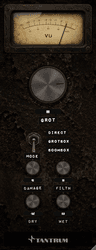
GROT ships as a signed, notarised disk image containing every format it is currently available in. You drag the format your DAW uses into the matching folder, and that's the whole install.
What you need
- macOS 11.0 or later
- An Apple Silicon (arm64) Mac
- A DAW that hosts AU or VST3 plug-ins
Getting the installer
Your purchase or access code entitles you to a download link. Enter the code at tantrumaudio.co.uk/downloads/grot and the link is emailed to you. Keep that email, because the same link serves updates.
The file is GROT-0.1.2.dmg.
Installing
- 1Open GROT-0.1.2.dmg. The window shows the plug-in bundles alongside shortcut folders pointing at the standard install locations.
- 2Drag GROT.component onto AU Plug-Ins, for Logic Pro, GarageBand, and anything else that hosts Audio Units.
- 3Drag GROT.vst3 onto VST3 Plug-Ins, for Ableton Live, Cubase, Reaper, Studio One, Bitwig and most other hosts.
- 4Enter your admin password when macOS asks. These are system-wide folders, so it will.
- 5Eject the disk image.
You only need the format your DAW actually uses. Installing both is harmless if you're not sure, and is what most people should do.
GROT is signed with a Tantrum Audio Developer ID and notarised by Apple, and the notarisation ticket is stapled to the disk image. It should install without any Gatekeeper warning at all. If macOS does complain that the developer cannot be verified, the download is incomplete or corrupted. Re-download rather than overriding the warning.
Where the files end up
| Format | Location |
|---|---|
| AU | /Library/Audio/Plug-Ins/Components/GROT.component |
| VST3 | /Library/Audio/Plug-Ins/VST3/GROT.vst3 |
Note the leading /Library: that's the system-wide library at the root of your disk, not the ~/Library inside your home folder.
Making your DAW find it
Logic Pro / GarageBand. Logic validates new Audio Units at launch. If GROT doesn't appear under Audio Units → Tantrum Audio, open Logic Pro → Settings → Plug-in Manager, find GROT and click Reset & Rescan Selection.
Ableton Live. Settings → Plug-Ins, make sure Use VST3 Plug-In System Folders is on, then click Rescan.
Pro Tools. Not yet. GROT does not currently ship an AAX build, so it will not appear in Pro Tools. One is coming soon; the download link in your email serves updates, so the AAX build will be in the disk image when it lands.
Everything else. Rescan your plug-in folders from your host's preferences. Most hosts only scan at startup, so a restart usually does it.
Updating
Install the new version exactly the same way and let it replace the old files. Sessions keep their settings, because parameters are stored by name and every version of GROT reads earlier sessions.
Logic caches Audio Units aggressively and will keep using a stale copy if one is still installed. If an update doesn't seem to have taken, check that there isn't an older GROT.component left somewhere else on the system, then rescan in the Plug-in Manager.
Uninstalling
Delete the files listed in the table above. GROT installs nothing else: no preference files, no support folders, no background processes.


