



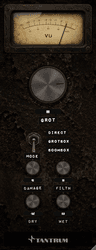
Click the VU meter. It swings away and reveals a cavity routed into the faceplate, holding four more controls: input staging on the left, sidechaining on the right. Click the cavity's background to put the meter back.
Opening it
Nothing in here is required. The front panel is the plug-in. This is where you go when the front panel isn't behaving the way a particular source needs.
INPUT — GAIN
Range: −24 dB to +24 dB. Default 0.0.
GAIN is applied to the plug-in's input ahead of absolutely everything else, so it sets how hard the source drives the degradation rather than how loud the output is.
This matters because every stage in GROT is level-dependent. The cone tears according to excursion, the slap fires on transient level, the terminal failure only rages when you push signal into it. A quiet source barely moves any of it, while a hot one wrecks everything at settings that sounded moderate a moment ago.
- Turn it up to make a quiet track break up properly without pushing DAMAGE and GROT to positions you don't want tonally.
- Turn it down to starve a hot source and get a subtler, more controlled version of the same settings.
The dry path, the automatic level match and the VU meter all follow the gain, so you are staging the plug-in rather than unbalancing it.
INPUT — TILT
Range: −6 dB to +6 dB. Default 0.0.
TILT leans the input spectrum before any distortion, using two complementary shelves either side of an 800 Hz pivot. Turn it up and the top rises while the bottom falls, and turn it down for the reverse.
Because it sits ahead of everything nonlinear, it isn't an EQ on the result. It changes what the breakup has to chew on:
- Positive tilt feeds the chain more top end, so the breakup comes out fizzier and more brittle.
- Negative tilt feeds it more bottom, so the breakup comes out woofier and fatter, with more work being done by the low bands.
At 0.0 the two shelves cancel exactly, so the centre position is a true bypass and costs you nothing.
TILT is the fix for a source that's tearing in the wrong register. If a bass part is fizzing when it should be farting, pull TILT down before you touch DAMAGE.
SIDECHAIN — THRESH and the switch
The sidechain lets another track drive GROT's destruction. When it's engaged, the sidechain's level rides GROT, DAMAGE and FILTH together between zero and wherever you've set them on the front panel.
That's the important part: the sidechain doesn't apply a fixed amount of some separate effect. It travels your own settings, so the whole character breathes with the key signal rather than a gain being ducked.
The switch
| Position | Behaviour |
|---|---|
| OFF | The gate is disengaged. The knobs behave exactly as set. This is the default. |
| OPEN | Clean when the sidechain is silent, rising to your knob positions as the sidechain reaches the threshold. |
| DUCK | Full effect when the sidechain is silent, falling to clean as the sidechain reaches the threshold. |
THRESH
Range: −60 dB to 0 dB. Default −24.0.
The sidechain level at which the gate is fully travelled. Below it, the effect is somewhere between clean and your settings, and at or above it the travel is complete.
The gate follows a fast (~10 ms) RMS of the sidechain, quick enough to move on individual drum hits, and is slewed over 15 ms so the ride itself stays click-free.
OFF is a real position, not an automatic one. Logic feeds a channel's own signal to an Audio Unit's sidechain bus when no source is selected, so GROT can't tell "nothing connected" from "connected and playing". If you're not sidechaining, leave the switch on OFF, otherwise the track will be keying itself.
Setting one up
- 1Send or route a key signal to GROT's sidechain input. In Logic that's the Side Chain menu at the top right of the plug-in window, and in most other hosts it's a send to GROT's second input bus.
- 2Set the front-panel knobs to how you want the fully engaged sound.
- 3Set the switch to OPEN or DUCK.
- 4Adjust THRESH until the movement matches the key track's level.
Two things worth trying: a kick keying OPEN on a bass track, so the bass falls apart only on the beat, and a vocal keying DUCK on a synth pad, so the pad is wrecked everywhere except under the vocal.
TILT and GAIN are not affected by the sidechain. Shaping what the distortion chews on is independent of how much of it is engaged.


