



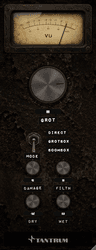
GROT is a tall, narrow channel strip that reads top to bottom in signal order. Everything is on one page. There are no tabs, no menus and nothing to scroll.
Top to bottom
| Position | Control | What it is |
|---|---|---|
| Top | VU meter | Damage done: how far the output has moved from the input |
| Below it | GROT | The hero knob: low-mid strain |
| Middle | MODE | Three-position lever: DIRECT, GROTBOX, BOOMBOX |
| Lower pair | DAMAGE / FILTH | Cone breakup and neglect |
| Bottom pair | DRY / WET | Two independent output levels |
| Between their readouts | LINK | Ties DRY and WET together at their current offset |
The order on the panel is not the order of the signal chain. The GROT knob is at the top because it's the one you reach for most. The actual chain runs input → MODE → DAMAGE → FILTH → GROT → limiter → DRY/WET sum, and is set out in full in Appendix B — Specifications.
The meter
This is a real VU, with the 300 ms averaging ballistic that implies. It will not show you peaks and it isn't trying to. What it reads is unusual: not output level, but the size of the difference between output and input, relative to the input.
- Below 100%: the processing is a colouration. Most of what you're hearing is still your signal.
- At 100%: the change GROT has made is as big as the signal it was given.
- In the red: GROT is generating more than it was handed.
Because DRY and WET don't affect it, the meter tells you how hard the processing is working regardless of how much of it you've mixed in.
The meter is also a door. Click it and it swings away to reveal a hidden panel with input gain, tilt and the sidechain controls. Click the cavity's background to put the meter back. Chapter 10 covers what's in there.
Reading and typing values
Every knob shows its value underneath. The three degradation knobs read 0–100. DRY and WET read in decibels, where -inf is silence and 0.0 is unity.
- Drag a knob vertically or horizontally to change it, or use the scroll wheel over it.
- Double-click the readout to type an exact value, then press Return.
- Hold ⌘, ⌥ or ⌃ while dragging to switch to velocity-sensitive mode, where a slow drag makes much finer changes than a fast one.
Resizing
The panel is resizable and keeps its proportions. There are two ways to do it:
- Click the small percentage chip below the meter's right-hand corner and pick Small (70%), Medium (85%), Large (100%), Extra Large (150%) or Huge (200%). Right-clicking anywhere on the background opens the same menu.
- Drag the bottom-right corner of the window.
Your chosen size is stored with the plug-in, so it comes back the same way in that session and in new instances.
Logic honours the size menu but not corner-dragging on Audio Unit windows. If dragging the corner does nothing, use the chip.
The first time you open GROT it opens at 100%. On a short display the panel may end up taller than the screen; pick a smaller preset from the chip and it will be remembered from then on.
Automation
Every control is automatable, and every continuous control is smoothed so automation doesn't produce zipper noise or clicks: 80 ms on DAMAGE, GROT and FILTH, 30 ms on DRY, WET, GAIN and TILT. Filter coefficients are recalculated every 32 samples internally rather than once per host block, which is why fast knob moves stay clean.
MODE and the sidechain switch are discrete: they change instantly, with no crossfade. Automate them in a gap if you don't want to hear the join.


