



The problems people actually hit, and what to do about them. Most reports turn out to be one of the first few.
Installing and finding it
GROT doesn't appear in my DAW.
Rescan your plug-in folders from your host's preferences, and restart the host, because most only scan at launch. Then confirm the file is in the right place: /Library/Audio/Plug-Ins/Components/GROT.component for AU and /Library/Audio/Plug-Ins/VST3/GROT.vst3 for VST3. Note the leading /Library: the system one, not ~/Library inside your home folder. There is no AAX build yet, so GROT will not appear in Pro Tools.
Logic says the plug-in failed validation.
Open Logic Pro → Settings → Plug-in Manager, find GROT, and click Reset & Rescan Selection. If it still fails, check there isn't a second, older copy of GROT.component installed elsewhere, because Logic will keep using a stale one.
An update doesn't seem to have installed.
Same cause, usually. Delete every copy of the plug-in you can find, then install the new one and rescan.
macOS says the developer can't be verified.
It shouldn't, because GROT is signed with a Tantrum Audio Developer ID, notarised, and the ticket is stapled to the disk image. If you see this, the download was incomplete or corrupted. Re-download rather than overriding the warning.
It doesn't sound right
Everything went band-limited and mid-heavy the moment I inserted it.
That's GROTBOX, which is the default MODE, heard on its own because DRY starts at -inf. It's working correctly. Switch MODE to DIRECT for full bandwidth, or bring DRY up to blend the untouched signal back in.
I can't hear the slap on kicks.
The driver slap engages above 40 on DAMAGE and ramps in from there. Below that only the breakup and instability are running. Get DAMAGE above 40 and use GROTBOX, where the slap is tuned high and boosted so it cuts through. Also check the source actually has hard transients. The slap fires on onsets, and there's a 60 ms lockout after each one so it can't flutter.
DAMAGE sounds almost the same at 30 as at 60.
Check MODE first. Through DIRECT's full bandwidth the breakup is far less obvious than through GROTBOX's narrow, resonant band. Then check your input level, because every stage in DAMAGE is excursion-driven, so a quiet source barely moves it. Raise GAIN in the hidden panel rather than pushing DAMAGE further.
The top of the DAMAGE knob sounds cleaner than the middle.
It shouldn't, and this was specifically designed out: above 60% the level match stops tracking so the terminal-failure stage isn't ducked back down. If you're hearing it, check whether something after GROT is compressing hard.
GROT sounds like it's just closing a filter.
It shouldn't, because an active high shelf compensates for exactly that. Check you haven't got MODE on BOOMBOX, whose top end is dark by design (4.5 kHz), and check nothing downstream is reacting to the level change.
Noise between notes.
That's FILTH, and it's intentional: the grime opens with signal and fades in silence, but at high settings it's audible at low signal levels too. Automate FILTH down for the gaps, or gate after GROT.
Level
The output is clipping.
The soft limiter sits on the wet path only, before the output faders. The DRY + WET sum isn't limited, so pushing both faders up with DAMAGE and GROT high can exceed 0 dBFS. Add a limiter or a gain trim after GROT.
The level ducks for about a second when a loud passage starts.
This is a known behaviour of the automatic level match at high DAMAGE and GROT settings. Distortion adds energy, so a sudden loud onset makes the wet path measure hotter than the dry one and the trim pulls down, but its 250 ms slew means you hear the correction after the onset rather than at it. Workarounds: lower DAMAGE or GROT slightly, or drop GAIN in the hidden panel and make the level up after the plug-in.
Two very different settings sound the same volume.
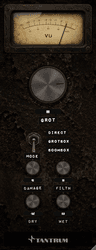
That's the level match doing its job. Use the VU meter's damage reading to compare how hard the processing is actually working.
The sidechain
The effect is moving on its own and I haven't connected a sidechain.
Set the sidechain switch to OFF. In Logic, an Audio Unit's sidechain bus is fed the channel's own signal when no source is selected, so with the switch on OPEN or DUCK the track ends up keying itself. OFF is the default for this reason.
The sidechain doesn't do anything.
Check three things: the switch isn't on OFF; a key signal is actually routed to GROT's second input bus; and THRESH is somewhere near the key signal's level. Also remember the gate travels your knob positions: if DAMAGE, GROT and FILTH are all at zero there's nothing for it to travel to.
The window
Dragging the corner doesn't resize it.
Logic doesn't allow Audio Unit windows to be resized that way. Use the percentage chip under the meter's right-hand corner, or right-click the background, and pick Small, Medium or Large.
It opened at a strange size.
GROT remembers the last size you used. Pick one from the size menu to reset it.
Still stuck
Appendix C — Support has the contact details and the information worth including when you write in.


