




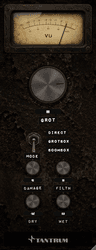
Five minutes, one drum loop, and you'll know what every knob does. Put GROT on a drum bus or a loop, something with transients, and play it in a loop while you work through this.
What happens the moment you insert it
GROT is not clean on insert. Out of the box the MODE switch sits on GROTBOX, WET is at 0.0 dB and DRY is at -inf, so you are hearing the small-speaker voicing and nothing else: the signal is band-limited to roughly 320 Hz–3.2 kHz and pushed forward in the mids.
The three degradation knobs (DAMAGE, GROT and FILTH) all start at zero. The speaker is cheap, but it isn't broken yet.
If the immediate band-limiting isn't what you want, flick MODE to DIRECT. That removes the cabinet entirely and leaves the signal full-bandwidth, with every other control still working.
1. Break the cone
Turn DAMAGE up to about 45.
The mids start to crumble first, then the top begins to rasp, and the whole thing develops a slow uncertainty: the drive level wanders at around 3 Hz, so the speaker never sounds settled. Somewhere past 40 you'll start hearing a mechanical flam a few milliseconds behind each hard transient: that's the loose driver slapping.
Sweep DAMAGE slowly from 0 to 100 once, and listen for the three stages: crunch, then the slap and the tearing buzz, then the whole driver failing in the last third.
2. Push it into strain
Turn the GROT knob, the big one, up to about 30.
This is the sound of a speaker being driven harder than it was built for. The low mids compress, a bark resonance rises in the middle of the band, and the whole thing gets denser and angrier without simply getting louder.
Above 50 a second layer arrives: a bright, fizzy chainsaw saturation that adds serious bite. Try it, then come back down.
3. Add the neglect
Turn FILTH to about 20.
Now the speaker is dirty as well as broken: a low-mid noise floor that opens whenever signal is flowing, occasional crackle from corroded contacts, and a grainy digital corruption underneath. FILTH is the only control that adds something that wasn't in your signal.
4. Choose how much of it you want
DRY and WET are two independent output levels rather than one blend knob. Right now DRY is muted and WET is at unity, so you're hearing the wreckage on its own, a full insert.
To use GROT in parallel instead, bring DRY up to about -6.0 and pull WET down to taste. The two paths are sample-aligned, so there's no phase weirdness in the sum.
5. Watch the meter
The VU meter at the top isn't an output meter. It reads damage done: how much of what's coming out was not in what went in. At 100% the change is as large as the original signal. In the red, GROT is putting out more junk than signal.
Use it to compare settings honestly, especially when the auto-gain has made two very different settings sound similar in level.
Where to go next
- One chapter per control, starting with Chapter 5 — MODE — choosing the speaker.
- Worked settings for real material: Chapter 11 — GROT in the mix.
- The controls hidden behind the meter: Chapter 10 — The hidden panel.
Big moves of DAMAGE and the GROT knob change output level as well as tone. There's an internal level match, but it's deliberately slow and it doesn't catch everything. Keep your monitors low while you explore.


